ORIX Clean
See what fills the disk, and remove it safely
v1.0.0 · macOS 15.0+
Overview
ORIX Clean is a native macOS app for understanding and reclaiming disk space. It scans the folders you choose, maps what it measured, and proposes cleanup candidates: caches, developer data, downloads, exact duplicates, similar images, large files, application leftovers and the Trash. Version 1.0.0 was published on 2026-11-21 as a universal disk image signed with a Developer ID and notarized by Apple.
Every candidate states a reason, a risk level and a consequence. Removal always goes through a preview, items are moved to the Trash, and each outcome is recorded. A safety policy in the deletion engine refuses system folders, standard folders themselves, application internals and photo-library internals, whatever asked for the removal.
The engine is a separate Swift package with its own tests, and the app has no network code. The interface is localised in English and Canadian French, and the source code is public.
Key features
- 01
Fast, cancellable scan
The scanner traverses directories in parallel, can be paused or cancelled, never follows symbolic links, and reads names, types, sizes and APFS sharing facts in a single pass per directory.
- 02
Interactive storage map
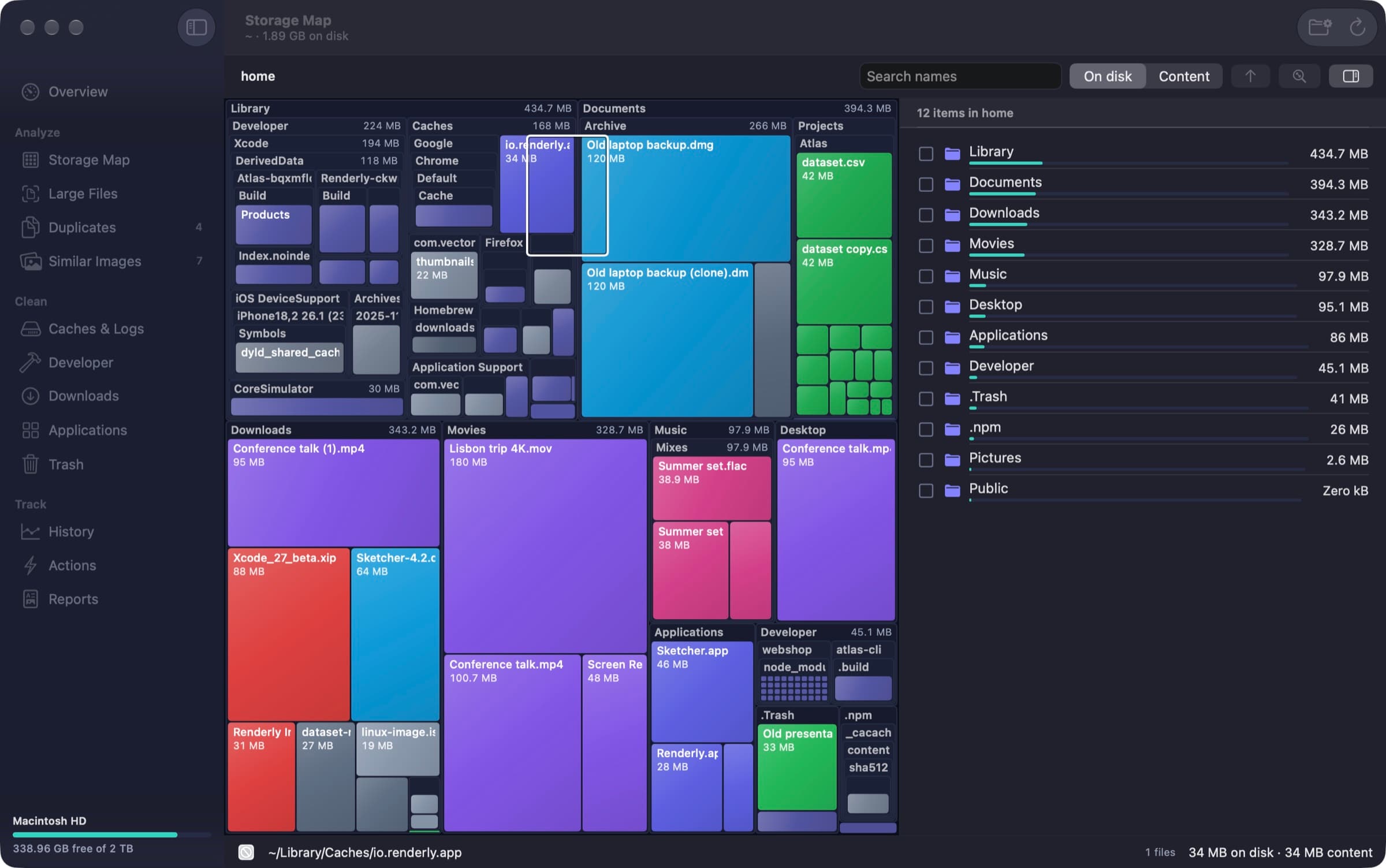
A squarified treemap of the scanned tree with drill-down, zoom, pan, hover details and search. Sizes can be shown as space on disk or as content size.
- 03
Exact duplicate detection
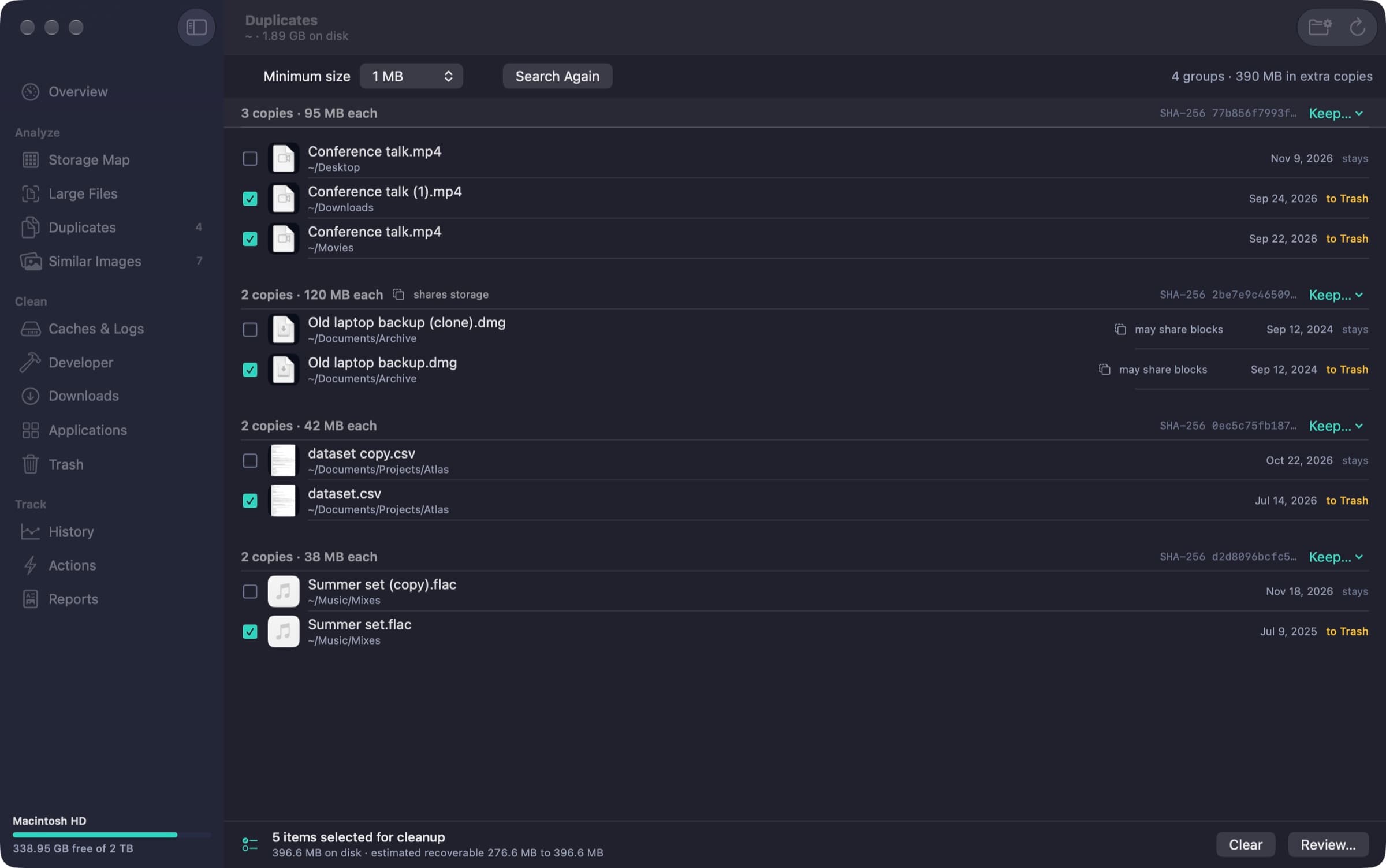
Duplicates are found by size groups, a sampled hash, then a full SHA-256, and a copy is compared byte for byte with the one you keep before it is removed. Hard links and APFS clones are recognised, and a group is never emptied.
- 04
Similar images, reviewed by hand
Near-duplicate images are grouped on the Mac with a difference hash and confirmed with Vision feature prints. Nothing is preselected.
- 05
Candidates with reason, risk and consequence
Caches, logs, developer data and downloads come from a documented catalogue of 35 known locations. Every row states why it is proposed, how risky it is and what removing it entails.
- 06
Mandatory preview, then the Trash
No removal happens without the preview. The deletion engine revalidates each item, moves it to the Trash and records every outcome, and the results sheet offers Put Back while the item is still in the Trash.
- 07
Uninstall assistant
Lists installed applications with their associated files and a stated certainty for each, and detects leftovers of applications that are no longer installed.
- 08
Reusable cleanup actions
Four built-in workflows, and your own, chain steps such as scanning a folder, finding duplicates, reviewing and moving to the Trash. A removal step can only follow a review step.
- 09
History and reports
Free space over time, watched folders and a cleanup log are kept in a local database while the app runs, and nine report types export as PDF, CSV, JSON or Markdown.
Screenshots
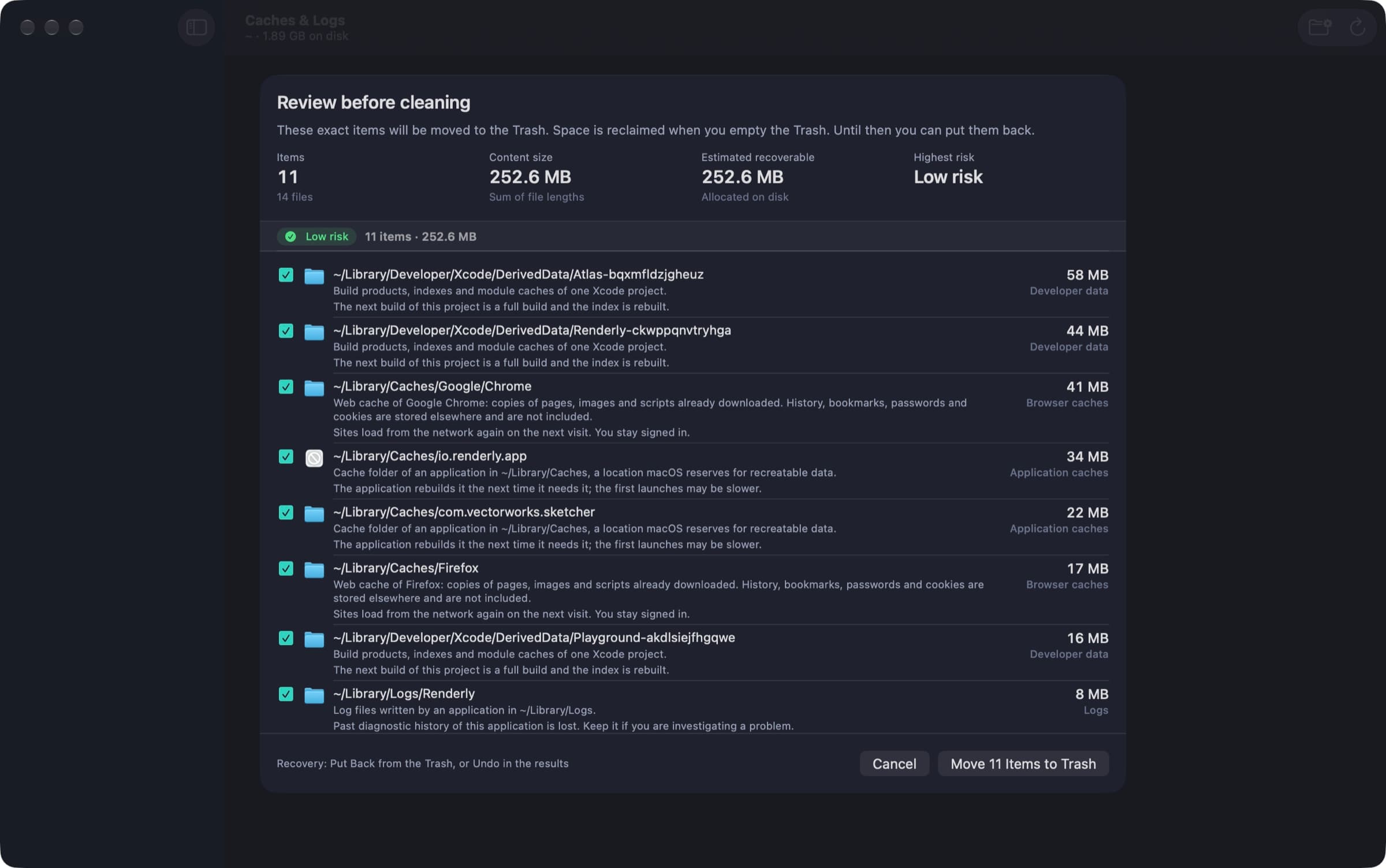
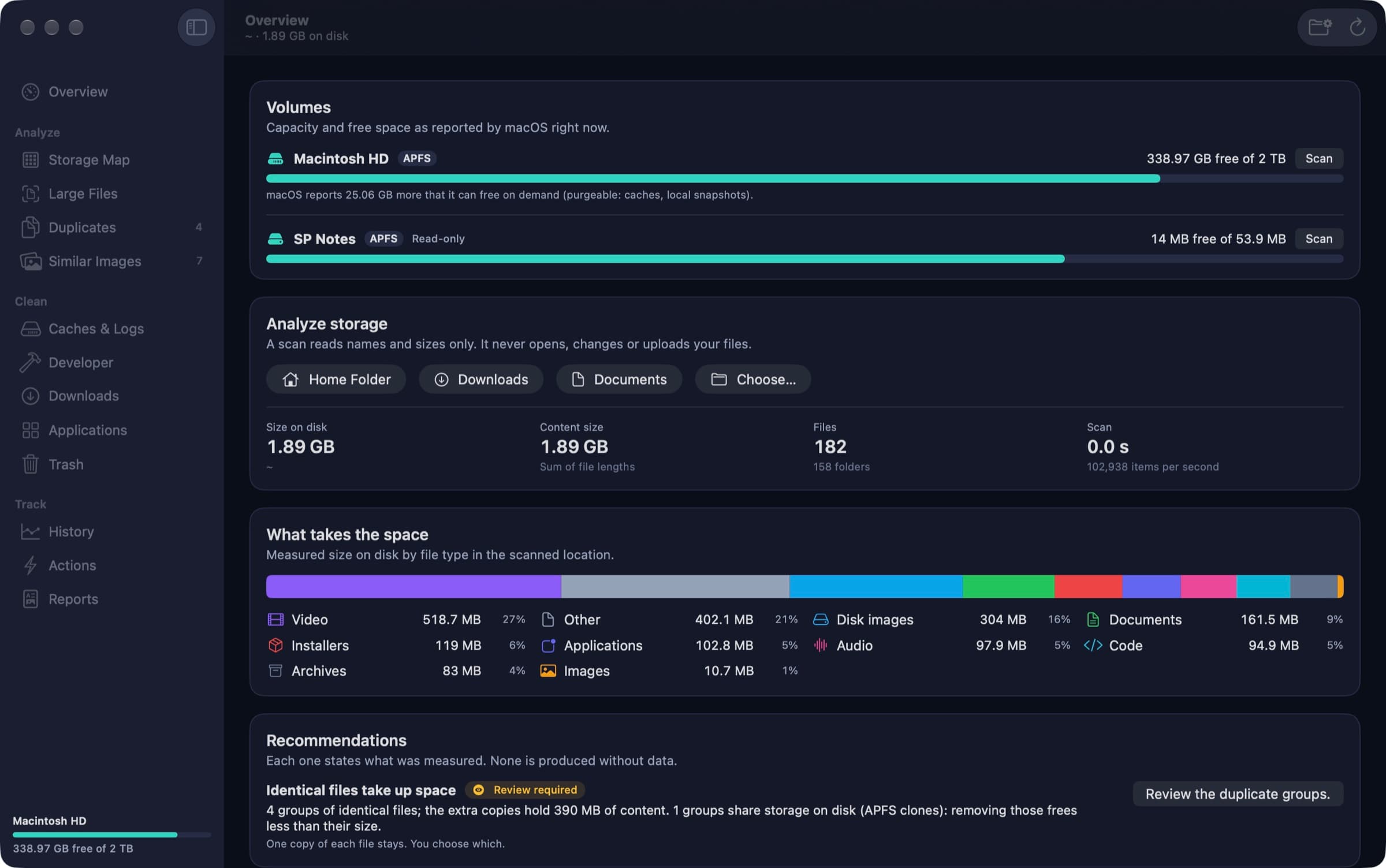
Storage map of a generated sample home folder: a treemap coloured by file type, with the folder list sorted by size beside it. Overview: volumes as macOS reports them, scan totals, the measured breakdown by file type and a recommendation with its evidence. Duplicates: four groups of identical files with their SHA-256, the copy that stays, and the estimated recoverable range. Review before cleaning: the 11 selected items, each with its reason and consequence, before anything is moved to the Trash. Applications: one application's signature facts and its associated files, each labelled “Review required” or “High risk”. The overview in Light Mode.
A closer look
A last line of defence in the engine
The safety policy sits inside the deletion engine, not in the interface. It refuses macOS and system-managed areas, top-level and standard folders themselves, the root of a volume, anything inside an application bundle and anything inside a library package such as a Photos library. The rule is to remove a whole item or nothing.
Honest about what removal frees
When APFS reports shared blocks, recoverable space is given as a range, from the sum of private sizes to the sum of allocated sizes, and hard links are reported as freeing nothing. Moving items to the Trash frees no space until the Trash is emptied, and the app says so. Space held by local snapshots is outside its control.
Measured, never estimated
The overview shows a breakdown by type computed from the scan, and recommendations are derived only from measured findings. The history shows only samples that were actually recorded, and every figure in a report comes from a measurement or a deletion record.
Works with the access macOS grants
Full Disk Access is optional. Without it, the app works on everything macOS lets it read and reports what was not read; with it, protected folders such as Mail, Safari data and the Trash are included. It never asks for an administrator password. For 1.0.0 the app was run without Full Disk Access; protected folders were exercised through permission-denied tests only.
Technical specifications
- Platform
- Mac (macOS)
- Minimum OS
- macOS 15.0
- Architectures
- arm64, x86_64
- Current version
- 1.0.0
- Release date
- November 21, 2026
- Download size
- 5.1 MB
- Permissions
- Desktop, Documents and Downloads folders: measured when you scan them.
- Removable and network volumes: measured when you scan them.
- Full Disk Access (optional): includes protected folders such as Mail, Safari data and the Trash.
- Offline
- Fully offline. The app has no network code and does not check for updates on its own.
- Languages
- English · French (Canada)
- Dependencies
- No third-party package. Uses Apple frameworks, including Vision for image similarity, and SQLite for the local history.
- Bundle identifier
- ai.spboucher.orix.clean
Downloads
macOS disk image
- Version
- 1.0.0
- Size
- 5.1 MB
- Requires
- macOS 15.0+
- Architecture
- arm64, x86_64
- Released
- November 21, 2026
- Checksum verified against the SPB Git release
- Notarized by Apple — verified on this server
SHA-256
c7a8b13f3db143e80d2902882d8fe069d68b6e89a1de212411dffdb7334bcd34
Not on the App Store yet.
Release data synchronized with SPB Git on November 21, 2026.
Release history
1.0.0 (1)
macOS downloadTag v1.0.0- First public release: tag v1.0.0, disk image and ZIP on git.spboucher.ai, source repository made public.
- Signed with a Developer ID, notarized by Apple (app and disk image) and stapled.
- Universal binary for macOS 15.0 or later, tested on macOS 27.0 with Apple silicon only; English and Canadian French.
- No automatic updates, and no plural forms in strings yet.
Privacy
No account, no network code, no analytics and no advertising. Scan results stay in memory.
- Only volume samples, watched-folder sizes, cleanup logs and saved actions are stored, in a local database.
- The recorded history can be erased from Settings; your files are not affected.
- Image similarity is computed on the Mac.
- The app never asks for an administrator password.
Verification status
Tested on physical devices
Per the release report of 2026-11-21: 56 core tests in 10 suites passed, with 86.7 % line coverage of the core. Of the 8 interface scenarios, the last full run on the released code passed 7; the eighth failed with “Failed to activate application” while another app's interface tests were running on the same Mac, then passed when run alone. The previous full run, one commit earlier, passed 8 of 8. Destructive tests use temporary folders and test disk images only.
Built, tested and run on one Mac only (MacBook Pro M5 Max, macOS 27.0). The published files were downloaded back: sizes and SHA-256 matched and Gatekeeper accepted the disk image. Never run: macOS 15, macOS 26 and the Intel slice. Not verified: installation on a second Mac, the app with Full Disk Access granted, a full-disk scan in the app, non-APFS, network and large external volumes, real photo collections (similar-image thresholds were calibrated on generated pictures), VoiceOver with a real user, measured contrast, and French screens other than the storage map. The final notarized binary was launched once for five seconds without a crash report; the full scan smoke test was done on the Release build made before the last fixes. Screenshots show the real app on a generated sample home folder of 182 files.
Questions
Where can I download it?
Version 1.0.0 is a 5.1 MB disk image on git.spboucher.ai, signed with a Developer ID and notarized by Apple. The source repository, orix-clean, is public on the same forge.
Which Macs does it run on?
The app is a universal binary (Apple silicon and Intel) built for macOS 15.0 or later. It has been built, tested and run only on macOS 27.0 with Apple silicon: macOS 15, macOS 26 and the Intel slice have never been run.
Can it delete something macOS needs?
The deletion engine refuses system folders, standard folders themselves, application internals and photo-library internals regardless of what asks. Full Disk Access never gives access to files protected by System Integrity Protection.
Are removed files gone for good?
Cleanup moves items to the Trash, and the results sheet offers Put Back. Emptying the Trash is a separate, permanent step that requires typing DELETE to confirm.
Does it need Full Disk Access?
No, it is optional. Without it the app works on what macOS lets it read and tells you what was not read.
Does it send anything over the network?
No. The app has no network code, which is also why there are no automatic updates: a new version is downloaded manually.
More from ORIX
See the full catalog Beta
ORIX Calc
Standard, scientific, financial, graphing, math, statistics, units and a reactive notebook on one exact engine, fully on device.
iPhoneiPadUtilitiesv1.0.0 Available
ORIX Monitor
A native macOS system monitor with local history, alerts and reports, where every value states its source.
MacSystemv1.0.0 Available
ORIX Sheet
A native Mac spreadsheet with 473 tested functions, an embedded data engine, charts, statistics and local Python. No account.
MacProductivityv1.0.0