ORIX Sheet
Spreadsheet, data and analysis on your Mac
v1.0.0 · macOS 14.0+
Overview
ORIX Sheet is a document-based spreadsheet for macOS, written in Swift. It edits workbooks on a grid of 1,048,576 rows by 16,384 columns and calculates them with its own formula engine: 473 functions, each backed by reference tests against an independent implementation.
Around the grid, it adds the tools analysts usually leave the spreadsheet for. An embedded DuckDB engine imports, queries and pivots large files and returns only the result to the sheet. There are 21 kinds of vector charts, multi-panel figures, 27 statistical analyses, financial modelling and what-if tools, a model auditor, and Python scripts that run locally in a restricted process you approve first.
There is no account, no analytics and no telemetry. It reads and writes XLSX, XLSM, ODS, CSV, TSV and JSON, exports paginated PDF, and announces what a format cannot hold before anything is lost. The interface is in English and Canadian French.
Key features
- 01
A full-size grid
1,048,576 by 16,384 cells per sheet, with fill handle and series detection, paste variants, freeze panes, merged cells, notes, links, named ranges, find and replace. Undo and redo cover everything, including structural edits.
- 02
473 functions, dynamic arrays
Its own formula engine with spilling arrays, LET and LAMBDA, structured table references and incremental recalculation that marks only the dependents of an edit. Circular references are detected and reported.
- 03
Data Studio, pivots and Transform
An embedded DuckDB 2.0.1 engine imports CSV, TSV, Parquet, JSON, SQLite and DuckDB files, with a virtualized preview, column profiles and an SQL console. Pivot tables with drill-down and ORIX Transform, a visual pipeline of 23 step kinds, run on it.
- 04
Charts and Figure Studio
21 chart kinds drawn by one vector engine, with trendlines, error bars, secondary axes and ten themes including colour-blind-safe palettes. Export to PDF and SVG with real text, or PNG; Figure Studio composes multi-panel figures.
- 05
Financial modelling and what-if
49 financial worksheet functions, a studio of 12 tools (loan and Canadian mortgage schedules, bond analytics, a DCF builder that writes live formulas) and 7 what-if tools including goal seek, scenarios and seeded Monte Carlo. What-if tools work on an isolated copy until you apply a result.
- 06
Statistics Studio
27 analyses on worksheet ranges: tests, ANOVA, regression with robust and clustered errors, panel and logistic regression, time series, PCA and clustering. Each result states the statistic, degrees of freedom, p-value and assumptions, and can be written to the sheet as a report.
- 07
Python Studio
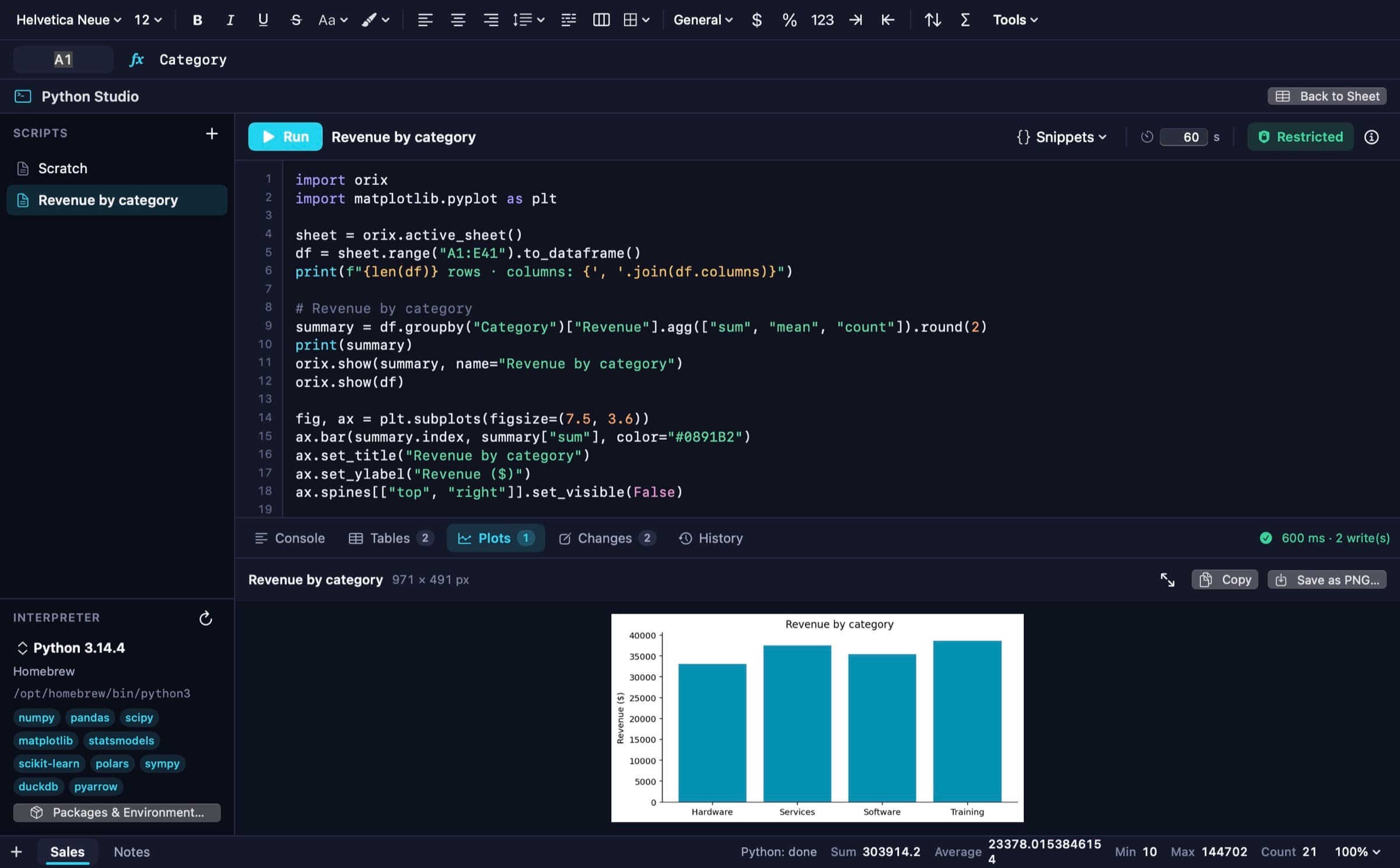
Run Python against workbook ranges with an interpreter already installed on your Mac; nothing is bundled. Restricted mode is on by default, a script that arrives with a file never runs without your review, and writes are applied as one undoable step.
- 08
Formula intelligence and auditor
Step-by-step evaluation with the engine's real intermediate values, a dependency graph, autocomplete and error explanations. The model auditor applies 21 rules, each finding with severity, evidence and a recommended action.
- 09
Files, templates and automation
Reads and writes XLSX, XLSM, ODS, CSV, TSV and JSON, and exports paginated vector PDF; a foreign file opens as an untitled workbook and the original is never overwritten. 15 templates, visual workflows of 25 step kinds and the orix-sheet command-line tool are included.
Screenshots
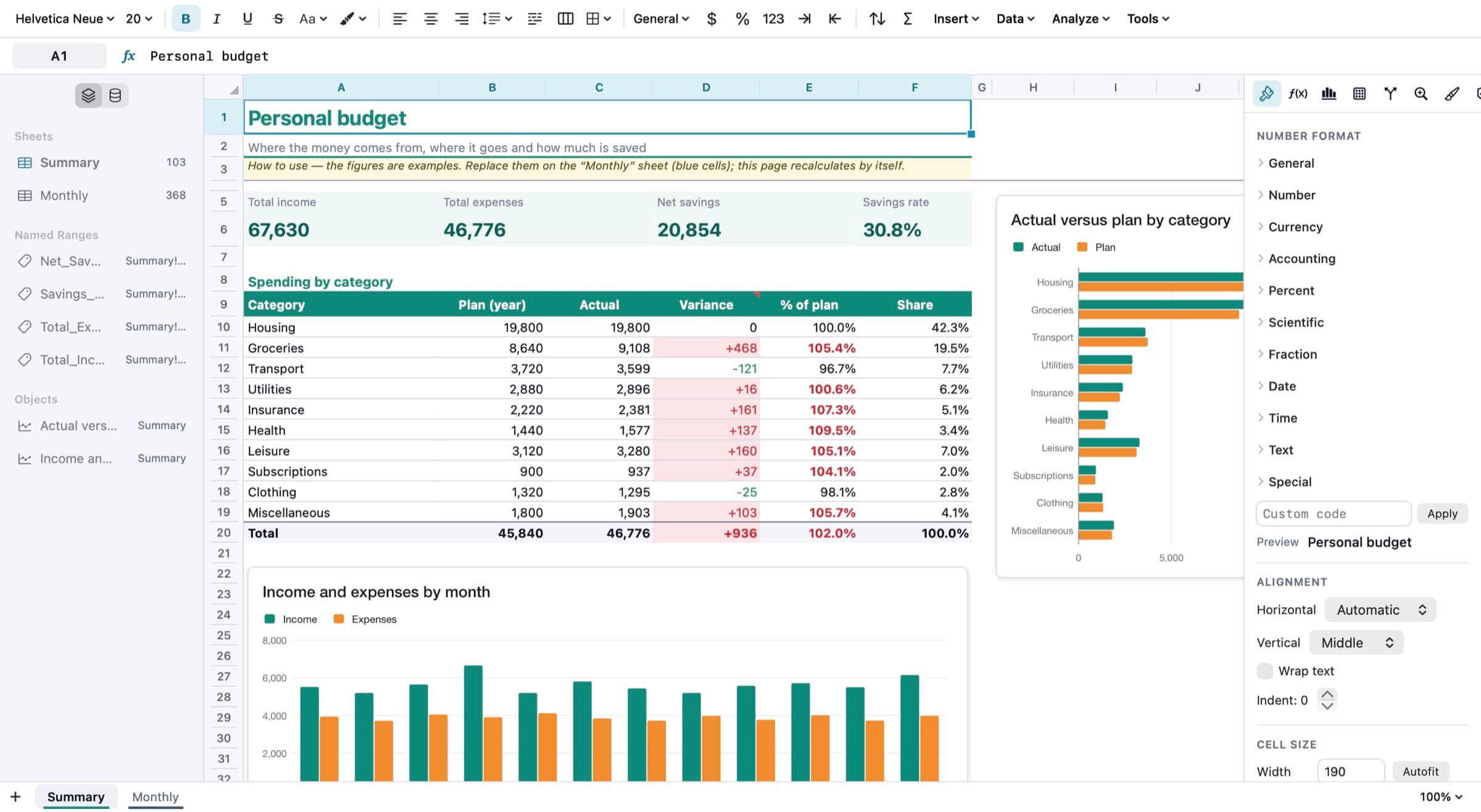
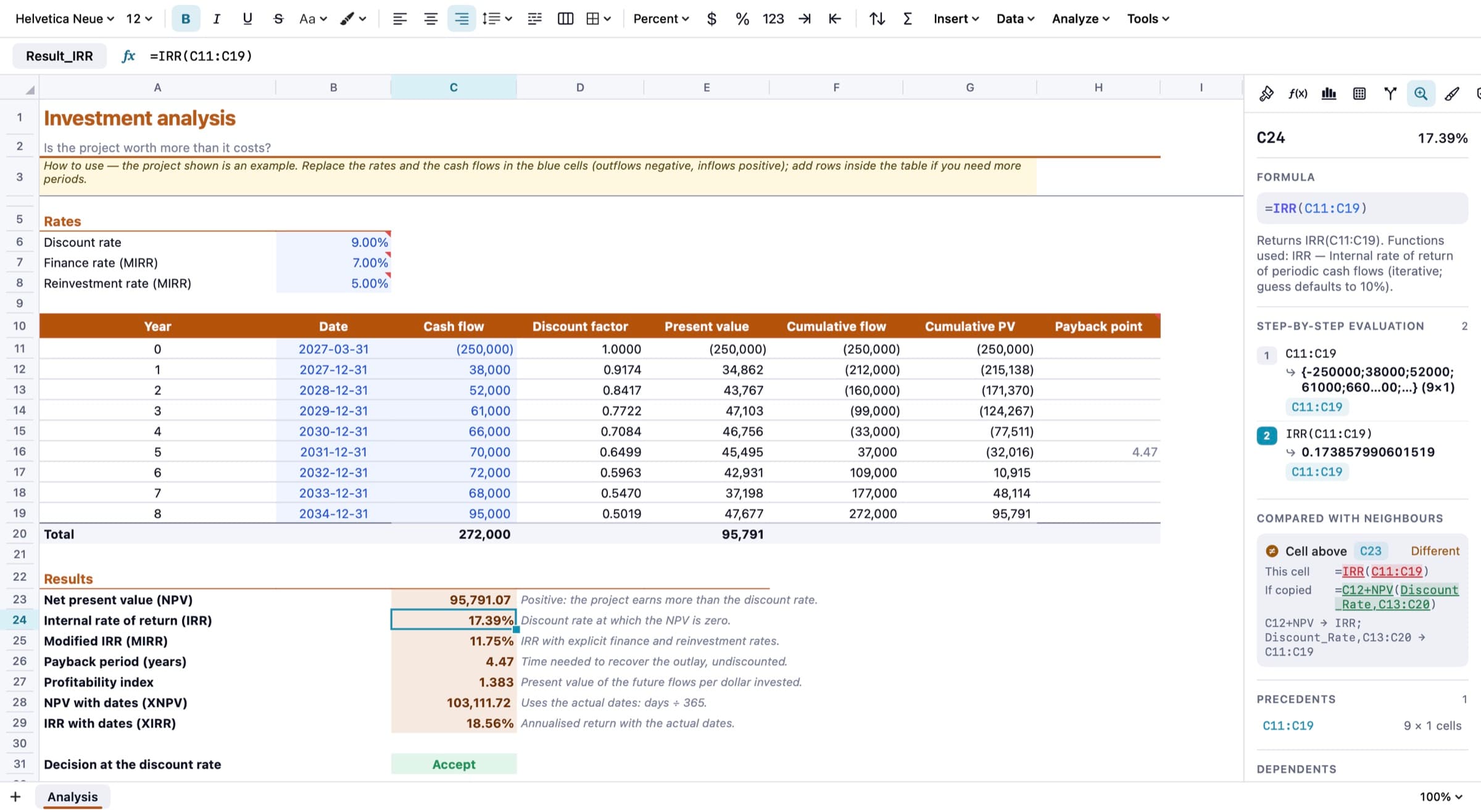
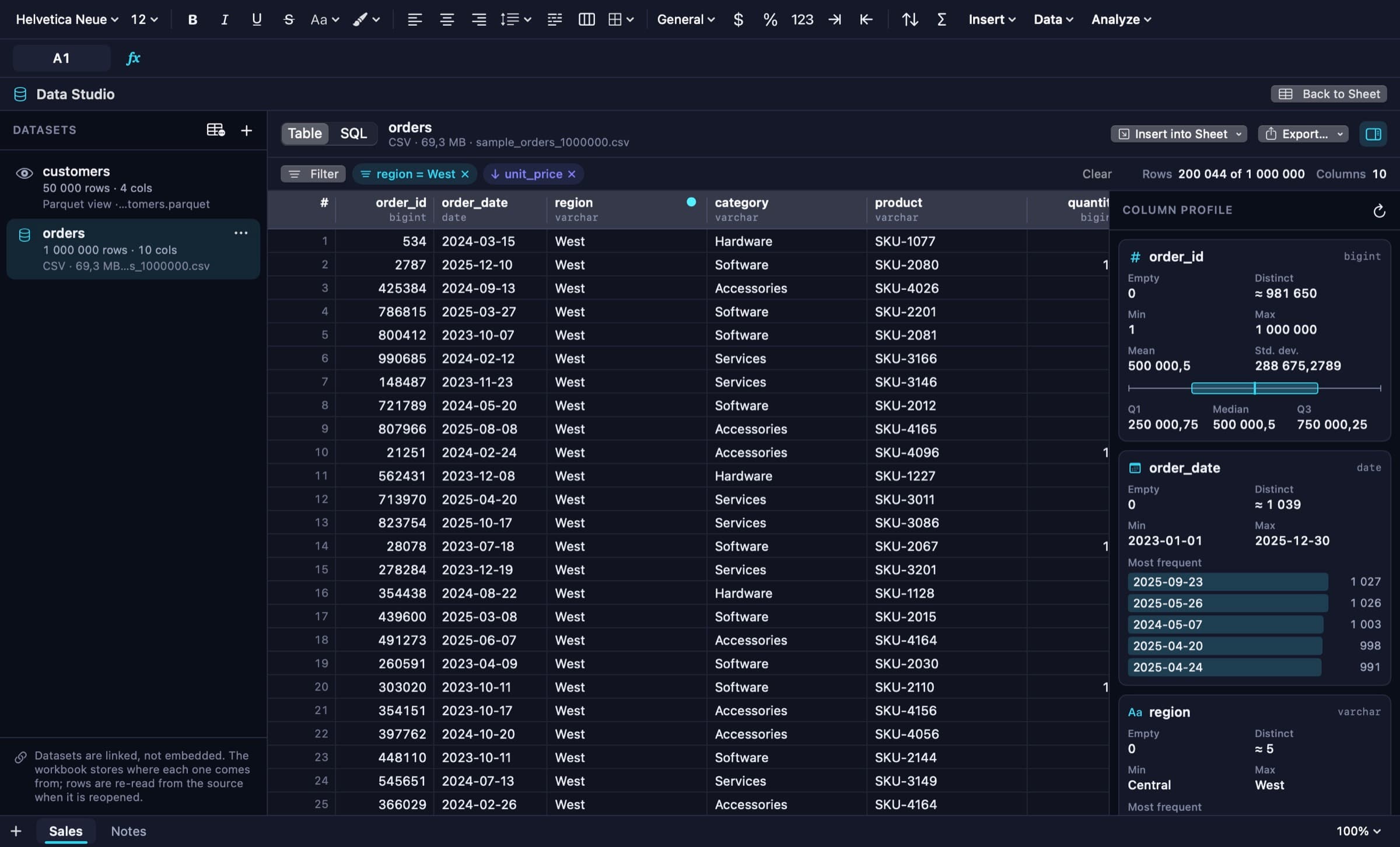
The Personal Budget template: KPI cells, a spending table with overspending highlighted, two charts and the format inspector. The same budget workbook in dark appearance, with the sheet list, named ranges and charts in the sidebar. Data Studio: a one-million-row CSV dataset filtered by region, with the column profile panel on the right. An investment analysis sheet with the formula panel: step-by-step evaluation of IRR, comparison with the neighbouring cell and precedents. Python Studio in Restricted mode: a script reading a range into a DataFrame, the captured matplotlib bar chart and the detected interpreter. A regression report from Statistics Studio: fit statistics with HC3 robust standard errors, a diagnostics table and variance inflation factors.
A closer look
A function counts only once it is tested
A function is listed as supported only after it passes reference tests against an independent implementation. The suites hold 15,378 numeric cases, 86,965 lookup and financial cases (68,075 of them values computed by Excel in a public data set), 7,951 text and date cases and 5,085 number-format cases. As an end-to-end check, the 18,714 formula cells of the 15 templates were recalculated by LibreOffice from the exported XLSX with no mismatch at 1e-6. Microsoft Excel itself was never launched; its behaviour is taken from that data set and from its documentation.
Large data beside the grid, not in it
The worksheet and the analytical engine are separate. A large file is imported into the embedded DuckDB engine, previewed through a virtualized window, filtered, joined and aggregated there, and only the selected result is written into cells; asking for more than a sheet can hold is refused with an explanation rather than truncated. On the build machine, a 10,000,000-row CSV was imported in 0.30 s and a pivot took 38 ms: one machine's measurements, not guarantees. Datasets are linked, not embedded, and are re-read from their source when the workbook is reopened.
Python that you approve first
Python runs as a separate process and exchanges values with the workbook as JSON over private pipes. In restricted mode, verified by tests on macOS 27.0, the script has no network, cannot write outside its run folder, cannot read under /Users, /Volumes or /tmp and cannot launch another program; if the sandbox is unavailable the run is refused. There is no hard memory limit, and every run is recorded in a local audit log. After you have reviewed a script, later edits typed in the same session run without a new prompt.
An assistant that never calculates
ORIX Intelligence uses Apple's on-device Foundation Models when the Mac supports them; there is no cloud model. The model does not compute: every formula it suggests is parsed, checked against the function registry and evaluated by the real engine on a copy of the workbook before it is shown. On 20 fixed requests measured on the build machine, all 20 received a formula that validates and 12 received one that computes the expected value, so a valid suggestion is not necessarily the one you meant.
Technical specifications
- Platform
- Mac (macOS)
- Minimum OS
- macOS 14.0
- Architectures
- arm64, x86_64
- Current version
- 1.0.0
- Release date
- November 21, 2026
- Download size
- 80 MB
- Permissions
- No entitlements — the app is not sandboxed and uses the hardened runtime
- Python Studio — needs a Python 3.9+ interpreter installed on the Mac; scripts run only after your approval
- ORIX Intelligence — needs a Mac and macOS version with Apple Intelligence; the rest of the app works without it
- Scheduling — a per-user LaunchAgent is installed only on your explicit request
- Offline
- The core works offline: calculation, files, charts, data engine and on-device assistance contain no network code. The single network use is pip install, run only when you ask for it in Python Studio and confirm it.
- Languages
- English · French (Canada)
- Dependencies
- No third-party Swift dependency. DuckDB 2.0.1 (MIT) is embedded as an unmodified binary; everything else is Apple frameworks (SwiftUI, AppKit, Core Graphics, Core Text, Accelerate, Foundation Models).
- Bundle identifier
- ai.spboucher.orix.sheet
Downloads
macOS disk image
- Version
- 1.0.0
- Size
- 80 MB
- Requires
- macOS 14.0+
- Architecture
- arm64, x86_64
- Released
- November 21, 2026
- Checksum verified against the SPB Git release
- Notarized by Apple — verified on this server
SHA-256
04867c73714939249c1f2f19d085102932308765d29a7188dcd445a78231f861
Not on the App Store yet.
Release data synchronized with SPB Git on November 21, 2026.
Release history
1.0.0 (2)
macOS downloadTag v1.0.0- First public release: universal build (arm64 + x86_64) signed with a Developer ID, notarized by Apple and stapled.
- DMG, ZIP, SHA-256 checksums and release notes published under tag v1.0.0; the downloads were re-verified from the forge.
- Source made public in the orix-sheet repository.
- Build 2 replaces build 1 of the same day and adds French strings for the template chooser and the privacy text.
Privacy
No account, no registration, no advertising, no analytics, no telemetry. Workbooks stay on your Mac; Python and the assistant run locally.
- No network code in the calculation, file, chart, data or AI paths; the embedded DuckDB cannot load extensions or reach the network.
- The single network use is pip install, only when you ask for it in Python Studio and confirm it.
- Python scripts and workflows that arrive inside a workbook never run on open; approvals are tied to the exact text.
- Macros in XLSM files are never executed; external links are never fetched.
- The on-device assistant receives a bounded context: headers, types and a few sample rows.
- The app is not sandboxed, because Python's own sandbox cannot nest inside the App Sandbox; it uses the hardened runtime with no entitlements.
Verification status
Tested on physical devices
1,270 test functions in 22 packages and 9 tests hosted in the running app, all passing (run of 2026-11-21). The signed Release build was smoke-tested: the app launched and rendered a template, and the embedded command-line tool ran sql, convert and eval. There is no UI-automation (XCUITest) target and line coverage was not measured.
Run only on the build machine, an Apple silicon Mac on macOS 27.0. Not tested: the Intel build, macOS 14 to 26, a second clean Mac, and first launch from a downloaded (quarantined) copy. Microsoft Excel was never launched or automated, and dynamic-array metadata written for Excel has not been opened in Excel. VoiceOver has not been listened to by a person. Shortcuts discovery and LaunchAgent scheduling were not exercised in an installed build. In Python Studio, editor typing, the completion popup, file panels and a real pip install were not exercised by hand. The assistant's unavailable state is unit-tested but was not observed. All screenshots are rendered by the app's own views with synthetic sample data.
Questions
How do I install ORIX Sheet?
Download ORIXSheet-1.0.0.dmg, open it and drag ORIX Sheet to Applications. There is nothing to configure and no account. The disk image is signed with a Developer ID and notarized by Apple. There are no automatic updates.
Which Macs are supported?
macOS 14.0 or later; the app is a universal binary (Apple silicon and Intel). Only the Apple silicon build on macOS 27.0 has actually been run: the Intel build and macOS 14 to 26 are untested.
Does it open my XLSX files?
Yes. Values, formulas, styles, number formats, merges, names, tables, conditional formats, validations, notes, links and freeze panes are read and written. Charts, pivot tables and images inside an XLSX are preserved and written back but are not editable; macros are never run; .xls, .xlsb and Numbers files are refused with a clear message. ORIX charts are not exported to XLSX yet, and the export report says so.
Does anything leave my Mac?
No. There is no account, analytics or telemetry, and the calculation, file, chart, data and AI paths contain no network code. The only network use is pip install, when you ask for it in Python Studio and confirm it.
Do I need Python installed?
Only for Python Studio, which uses a Python 3.9 or later interpreter found on your Mac; nothing is bundled. The rest of the app does not need it.
What are the main limitations of 1.0?
Calculation is single-threaded, and inserting or deleting rows or columns rebuilds the dependency graph and recalculates the workbook. The grid has no text rotation or rich text inside a cell, iterative calculation is not supported, AppleScript is absent, and function names are English in every locale.
More from ORIX
See the full catalog Available
ORIX Docs
A native Mac word processor with real pagination, styles, equations, citations, track changes and DOCX and PDF exchange. No account.
MacProductivityv1.0.0 Beta
ORIX Scan
Scan paper into clean, searchable PDFs: capture, enhancement, text recognition and export all run on your iPhone or iPad.
iPhoneiPadProductivityv1.0.0 Available
ORIX Monitor
A native macOS system monitor with local history, alerts and reports, where every value states its source.
MacSystemv1.0.0