ORIX Docs
A native Mac word processor with real pages
v1.0.0 · macOS 15.0+
Overview
ORIX Docs is a native macOS word processor for documents that have to be paginated properly: reports, papers, theses, manuals, letters. It typesets with Core Text and flows text into pages with its own pagination engine, and the same renderer draws the screen, the thumbnails, print and PDF.
It covers the structure long documents need: inherited paragraph and character styles, six themes, tables, LaTeX equations, footnotes, captions, cross-references, a reference library per document with six built-in citation styles, track changes, comments and document comparison. Sixteen templates in English and French and six workspace modes (Writing, Page Layout, Review, Academic, Publishing, Focus) are included.
It works entirely on the Mac: no account, no telemetry and no network code. Documents are saved in the .orixdoc format; DOCX, RTF, Markdown, HTML and plain text are opened and exported, PDF is published as vector text, and every importer and exporter reports what it approximated or dropped before the file is written.
Key features
- 01
Real page layout
Sections with their own paper size, margins and columns, headers and footers with first-page and odd/even variants, footnotes at the foot of the column, widow and orphan control, and tables that continue across pages with repeated header rows. Screen and print paginate identically.
- 02
Styles, themes and typography
Paragraph and character styles with inheritance, six themes, numbered headings and an outline that moves a heading with everything under it. Character settings include weight, small caps, tracking, kerning, ligatures and a language per run; paragraphs get hyphenation, drop caps and tab stops with leaders.
- 03
Tables, images and shapes
Tables with merge and split, five table styles, sorting and cell formulas. Images can be inline or floating with text wrap, cropped and rotated, and carry alternative text; six basic shapes are available.
- 04
LaTeX equations
Equations are written in LaTeX math and typeset as vector glyphs on screen and in PDF, inline or as numbered display equations you can cross-reference. It is a subset of LaTeX math, not a TeX engine; an expression that does not parse is shown as its source in red.
- 05
Citations and references
A reference library per document with BibTeX/BibLaTeX, RIS and CSL-JSON import and export, and six built-in citation styles: APA 7, Chicago author-date, MLA 9, IEEE, Vancouver and numeric. Captions, cross-references, contents and lists of figures and tables are generated.
- 06
Track changes and comments
Inserted and deleted text, character formatting, pasted content and replacements are tracked with author and date, and accepted or rejected one by one, by selection or all at once. Comments support replies. Table structure, paragraph formatting and styles are not tracked.
- 07
Document comparison
Compare two documents side by side with word-level insertions and deletions and moved paragraphs detected. The result can be exported as a report or opened as a merged document in which every difference is a tracked change.
- 08
DOCX, PDF and other formats
Opens DOCX, RTF, Markdown, HTML, plain text and the text of a PDF; exports DOCX, PDF, RTF, Markdown, HTML and plain text. PDF output has vector text with embedded fonts, links, an outline from the headings, structure tags and optional crop marks.
- 09
Auditor and automation
A document auditor runs 24 checks and reports each finding with its evidence and location. Workflows process one document or a batch, and the orixdocs command-line tool bundled in the app converts, audits, compares and reports statistics.
Screenshots
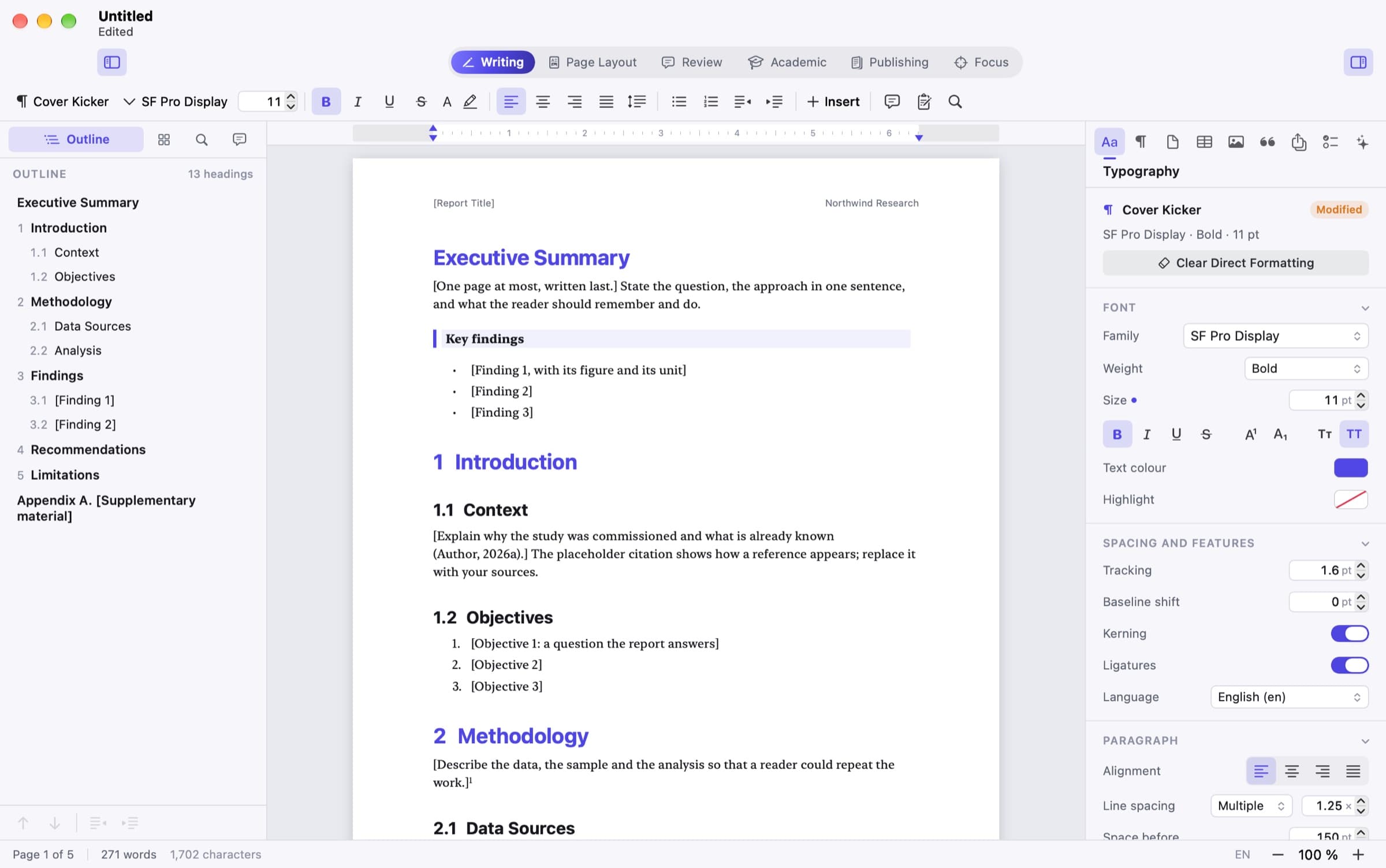
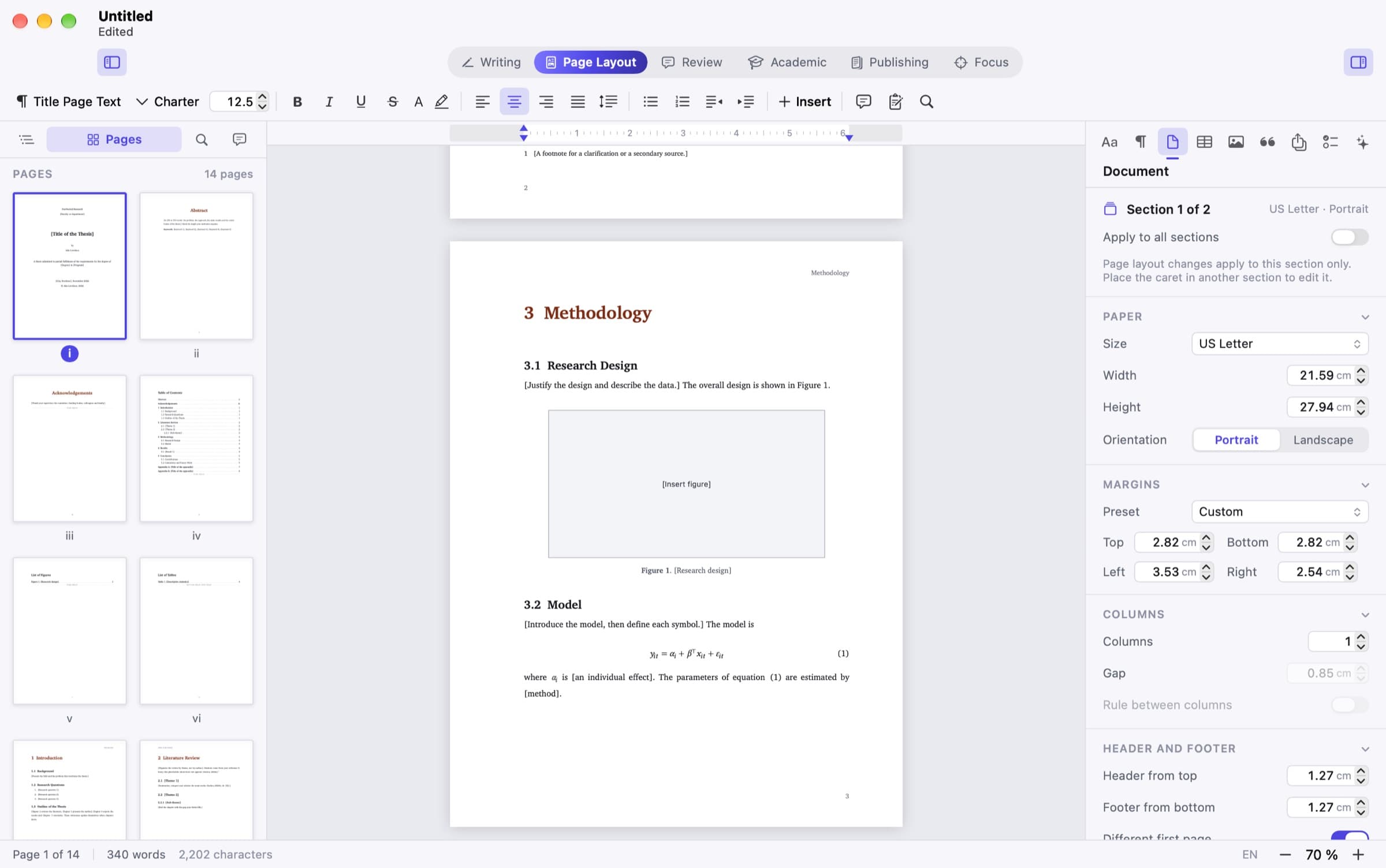
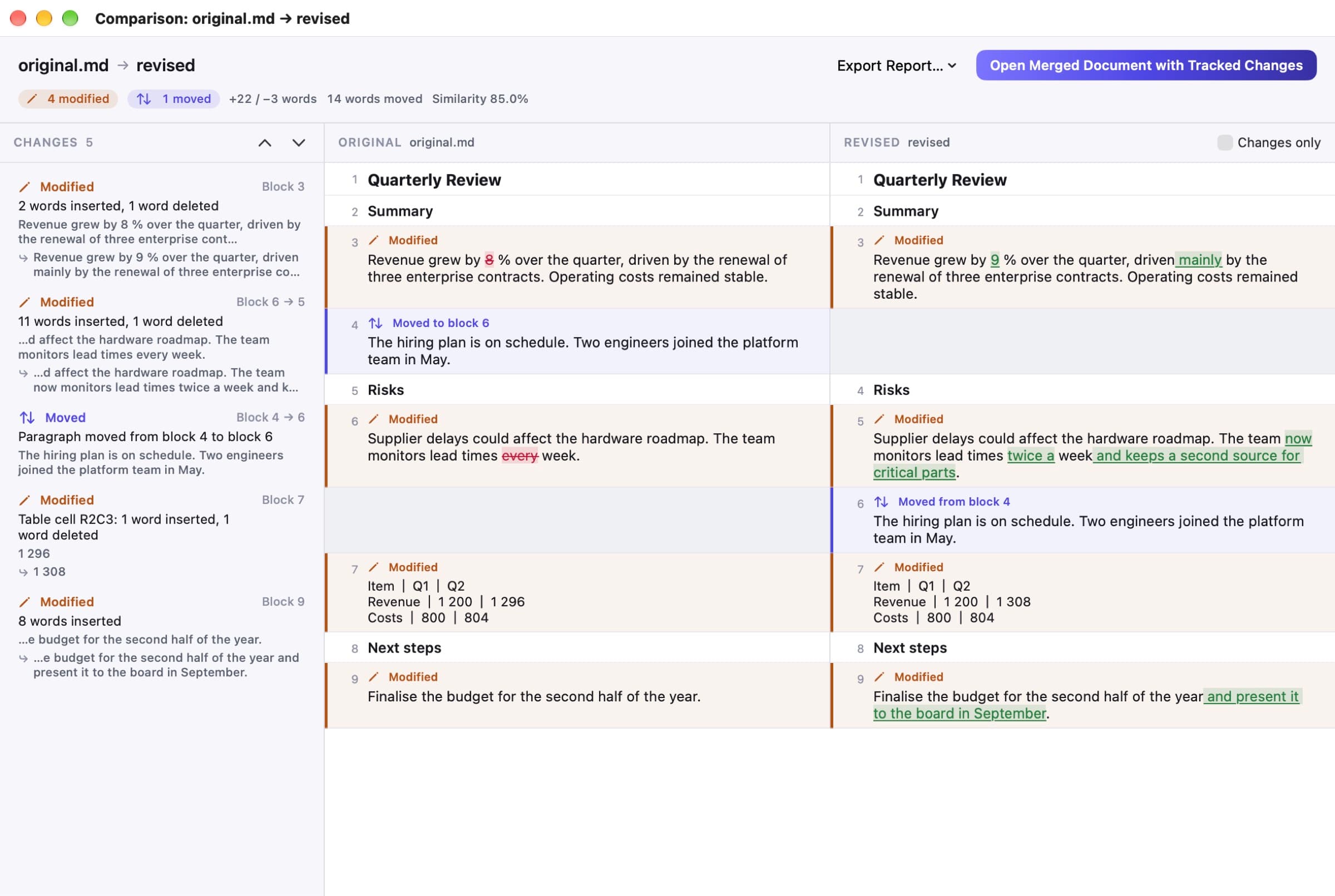
Writing mode on a research report: the outline with numbered headings on the left, the page in the centre and the Typography inspector on the right. Dark appearance: a two-column newsletter template with the Pages sidebar and the Styles inspector showing the six themes; the page stays white. Page Layout mode on a thesis: page thumbnails numbered in roman numerals, a figure placeholder and a numbered equation, and the Document inspector with paper, margins and columns. Academic mode: a paper with a captioned table and a numbered equation, and the References inspector set to APA 7th edition with a two-entry library. Review mode: four tracked changes by two authors with accept and reject buttons, comments with a reply, and an inserted sentence underlined on the page. The comparison window: a change list, original and revised columns side by side with word-level changes and a moved paragraph, and a button to open the merged document.
A closer look
A pagination engine written for this app
The editor is not a system text view: a custom canvas sits on a value-type document model, Core Text typesets the paragraphs and the app's own paginator flows them into pages. Contents, lists and page cross-references are recomputed by a multi-pass layout that stops when page numbers are stable. On a generated 487-page document, a cold layout took 0.43 s and the median relayout after a keystroke 13 ms on the build machine; these are single runs on one machine and no page-count limit is promised. Table rows and footnotes do not split across pages, and columns are not balanced.
Review that can be undone both ways
Comparison aligns blocks, pairs modified paragraphs by similarity, detects moves and diffs words inside each pair. The merged document it produces holds every difference as a tracked change, and a tested invariant, including 40 seeded random edit scripts, guarantees that accepting every change gives the revised text and rejecting every change gives the original. Differences the model cannot track, such as paragraph style or page setup, are reported but cannot be rejected.
DOCX exchange, with its limits stated
ORIX Docs reads and writes DOCX with its own engine. On a reference corpus of 19 small, mostly synthetic documents, all 19 imported, the model was equal after two import and export cycles and 172 feature checks passed; three independent readers opened or converted all 19 exports. Microsoft Word itself was not used in any test, perfect Word compatibility is not claimed, and layout fidelity in another application is not measured. Charts, SmartArt, embedded objects, nested tables and text boxes are dropped or approximated with a named warning, and macros are never executed or preserved.
Writing assistance that only proposes
Writing assistance uses Apple's on-device model only, on macOS 26 or later where Apple Intelligence is available; on macOS 15 the feature is disabled with an explanation and the rule-based tools remain. Every result is a proposal with Accept and Reject, and one Undo restores the original text. The quality of the model's output was not measured and nothing is claimed about it; the concise tone action often returns the text unchanged, which the panel reports as no edit proposed.
Technical specifications
- Platform
- Mac (macOS)
- Minimum OS
- macOS 15.0
- Architectures
- arm64, x86_64
- Current version
- 1.0.0
- Release date
- November 21, 2026
- Download size
- 31 MB
- Permissions
- No entitlements requested — the app is not sandboxed and uses the hardened runtime
- Links — a ⌘-click on an http, https or mailto link hands it to your default browser or mail app; no other scheme is opened
- On-device assistance — needs macOS 26 or later with Apple Intelligence available and enabled
- Offline
- Fully offline. The application and its engines contain no network code; there is no sync, no sharing service and no real-time collaboration, by design.
- Languages
- English · French (Canada)
- Dependencies
- One third-party dependency: SwiftMath, for math typesetting. Everything else is Apple frameworks (SwiftUI, AppKit, Core Text, Core Graphics, PDFKit, NaturalLanguage, Foundation Models) and code written in the repository.
- Bundle identifier
- ai.spboucher.orix.docs
Downloads
macOS disk image
- Version
- 1.0.0
- Size
- 31 MB
- Requires
- macOS 15.0+
- Architecture
- arm64, x86_64
- Released
- November 21, 2026
- Checksum verified against the SPB Git release
- Notarized by Apple — verified on this server
SHA-256
94144d313c91a029c44f2dc34add72f84a67dc35881875bcd36615aed5e7e38e
Not on the App Store yet.
Release data synchronized with SPB Git on November 21, 2026.
Release history
1.0.0 (2)
macOS downloadTag v1.0.0- First public release: universal build (arm64 + x86_64) signed with a Developer ID, notarized by Apple and stapled.
- DMG, ZIP, SHA-256 checksums and release notes published under tag v1.0.0; the downloads were verified from the public URLs.
- Source published in the public orix-docs repository.
- Build 2 replaces build 1 of the same day and adds an image-loader confinement fix found during the documentation review.
Privacy
No account, no telemetry, no analytics and no network code. Documents stay on the Mac.
- The application and the engines contain no networking calls; tests scan the sources for networking APIs and for any server-backed model type.
- No crash reporting of its own, no sync and no sharing service.
- Spelling, language analysis and the on-device model are macOS services; macOS itself may download language assets for them, but ORIX Docs does not initiate network requests.
- Imported documents are treated as untrusted: archive and XML limits, macros and embedded objects never executed or preserved, external targets never fetched.
- A foreign file opens as an untitled copy; the original is never written.
- The app is not sandboxed: a flaw in a parser would run with the user's file permissions. The native format has no encryption and no digital signature.
Verification status
Tested on physical devices
582 engine tests in 85 suites, all passed. An interaction self-test driving real key and mouse events passed 19 of 19 scenarios on the Debug build and on the notarized Release build. A kill-and-recover test after autosave passed. Engine line coverage is 92.9 % of 28,196 lines. The XCUITest suite (10 tests) was not run.
Verified on the build machine only, an Apple silicon Mac on macOS 27.0. Not tested: macOS 15 and 26, Intel Macs and a clean second Mac. Microsoft Word was never used to validate DOCX files; pandoc, textutil and LibreOffice were, on a small, mostly synthetic corpus of 19 documents. No PDF/A or PDF/UA validator was run. The Shortcuts actions were compiled but never run from Shortcuts. VoiceOver was not tested with a human listener; the accessibility statement is a review of the code. The quality of the on-device model's output was not measured. The French translation was not reviewed by a second person. Performance figures are single runs on one machine. All screenshots are captures of the app's own windows showing template content.
Questions
How do I install ORIX Docs?
Download ORIX-Docs-1.0.0.dmg, open it and drag ORIX Docs to the Applications folder. The disk image is signed with a Developer ID, notarized by Apple and stapled, so Gatekeeper can verify it offline. There are no automatic updates in 1.0.0.
Which Macs are supported?
macOS 15.0 or later; the app is a universal binary (Apple silicon and Intel). It was developed and tested on Apple silicon under macOS 27.0 only: the Intel build is built but untested, and macOS 15 and 26 were not tested.
Does it open and save Word documents?
It imports and exports DOCX. A DOCX opens as an untitled document, saving creates an .orixdoc, and writing a DOCX is an explicit export that lists what will be approximated or dropped. Microsoft Word itself was not used to validate the files, and perfect Word compatibility is not claimed.
Are the PDFs PDF/A or PDF/UA compliant?
No conformance is claimed and no validator was run. PDFs carry vector text, embedded fonts, links, an outline and structure tags, but the tag structure is partial: tables carry no row or cell structure.
Can I use my own citation style?
Not in 1.0.0. Six styles are built in; ORIX Docs is not a CSL processor, so a .csl file cannot be loaded and there are no note-based styles.
What does the editor not do?
The editing canvas is a custom view, so it has no grammar checking, autocorrection, text replacement, Writing Tools or Look Up; spelling is checked. There is no real-time collaboration, by design, and AppleScript is not supported.
More from ORIX
See the full catalog Available
ORIX Sheet
A native Mac spreadsheet with 473 tested functions, an embedded data engine, charts, statistics and local Python. No account.
MacProductivityv1.0.0 Beta
ORIX Scan
Scan paper into clean, searchable PDFs: capture, enhancement, text recognition and export all run on your iPhone or iPad.
iPhoneiPadProductivityv1.0.0 Available
ORIX Monitor
A native macOS system monitor with local history, alerts and reports, where every value states its source.
MacSystemv1.0.0