Overview
ORIX Scan turns paper into clean, searchable documents. It scans with the system document camera, cleans the page, reads the text with Apple's Vision framework, and writes PDFs that keep the scanned image and carry a selectable, searchable text layer.
Everything happens on the device. The app contains no networking code and no third-party dependency: there is no account, no upload and no tracking. Originals are always kept, edits are non-destructive, and export sizes are measured by building the file rather than estimated.
A library with folders, favourites and search across recognized text keeps documents in order, and ORIX Actions chains enhancement, recognition, renaming, filing and export into a single tap.
Key features
- 01
Capture and import
Multi-page capture with the system document camera: automatic edge detection, perspective correction, flash and retake. Import photos, images and PDFs from Photos, Files, the share sheet or drag and drop on iPad, including password-protected PDFs you can unlock.
- 02
Non-destructive enhancement
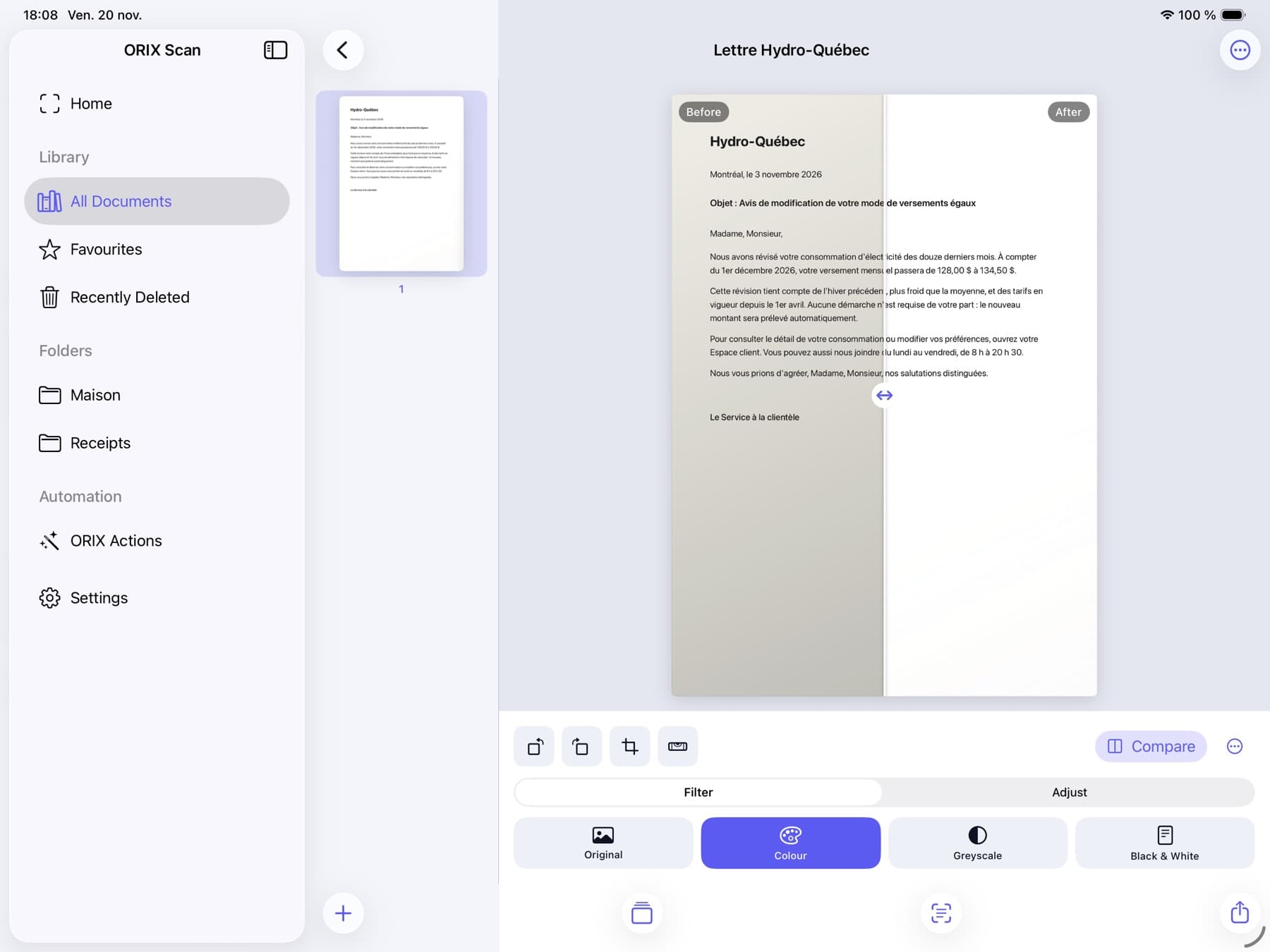
Colour, Greyscale and Black & White filters that flatten shadows and clean the background, plus brightness, contrast, sharpening and noise reduction. The original capture is always kept, with a draggable before / after comparison.
- 03
Crop, straighten, page advice
Four-corner crop with perspective correction, 90° rotation and automatic straightening. Dismissible quality advice flags blur, low contrast, poor lighting and text touching the edge.
- 04
On-device text recognition
Apple Vision recognition in Automatic, Fast and Accurate modes, with progress and cancellation. Search, copy, correct line by line and export the text; the language list is whatever your version of iOS reports.
- 05
Tables to CSV
Simple tables are rebuilt from word positions into an editable preview and exported as CSV. Uncertain cells are highlighted so you can check them first.
- 06
Searchable PDF
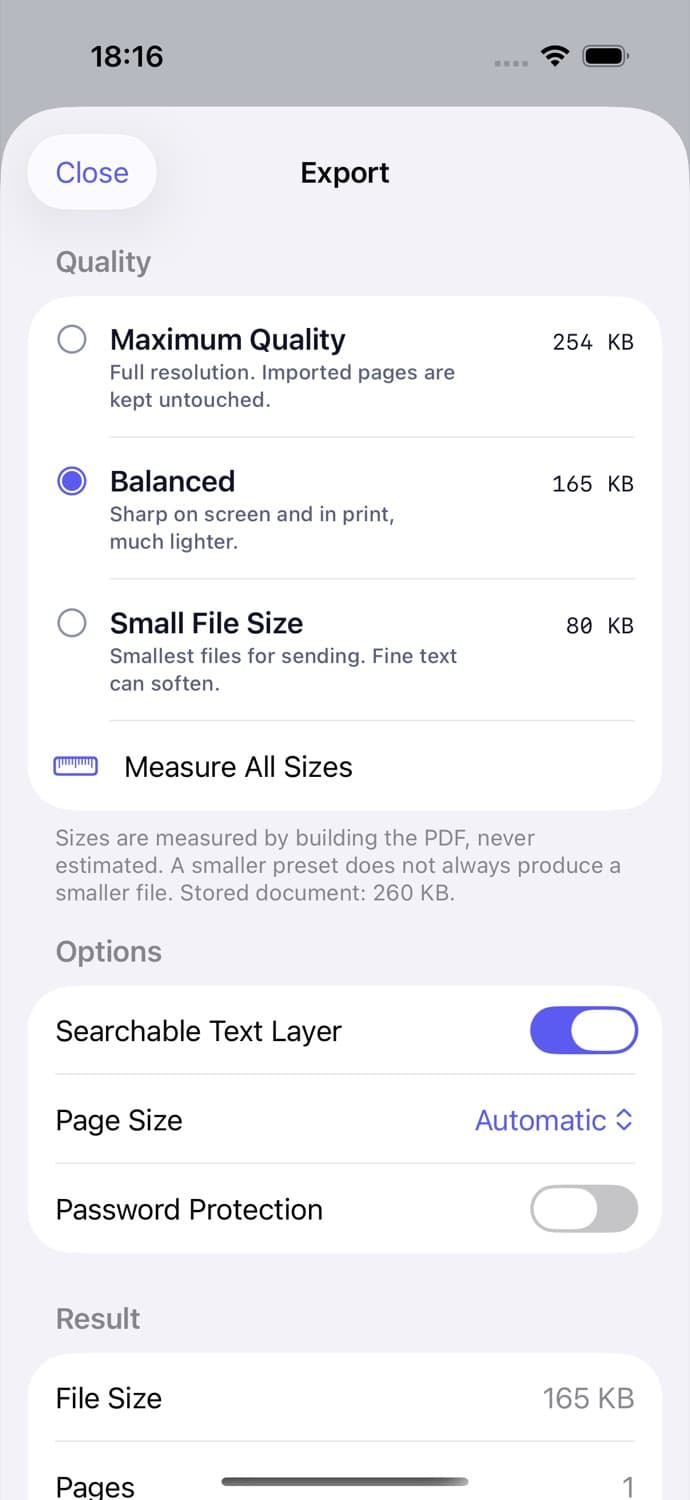
PDFs keep the scanned image and add an invisible text layer placed word by word. Three quality presets show the real resulting file size, with optional password protection, metadata, A4 and US Letter page sizes.
- 07
Page and document tools
Merge, split, extract, reorder, rotate, duplicate and delete pages, and insert scans, images or PDFs. Source documents are never modified.
- 08
Library
Recents, favourites, folders and Recently Deleted (30 days), with search across titles and recognized text, sorting, filters and batch actions.
- 09
ORIX Actions
Chain steps into one tap: enhance, recognize, rename, file, export. Eight presets such as Scan to Searchable PDF, Receipt Archive and Extract Tables, plus a builder for your own actions that can run on several documents at once.
Screenshots
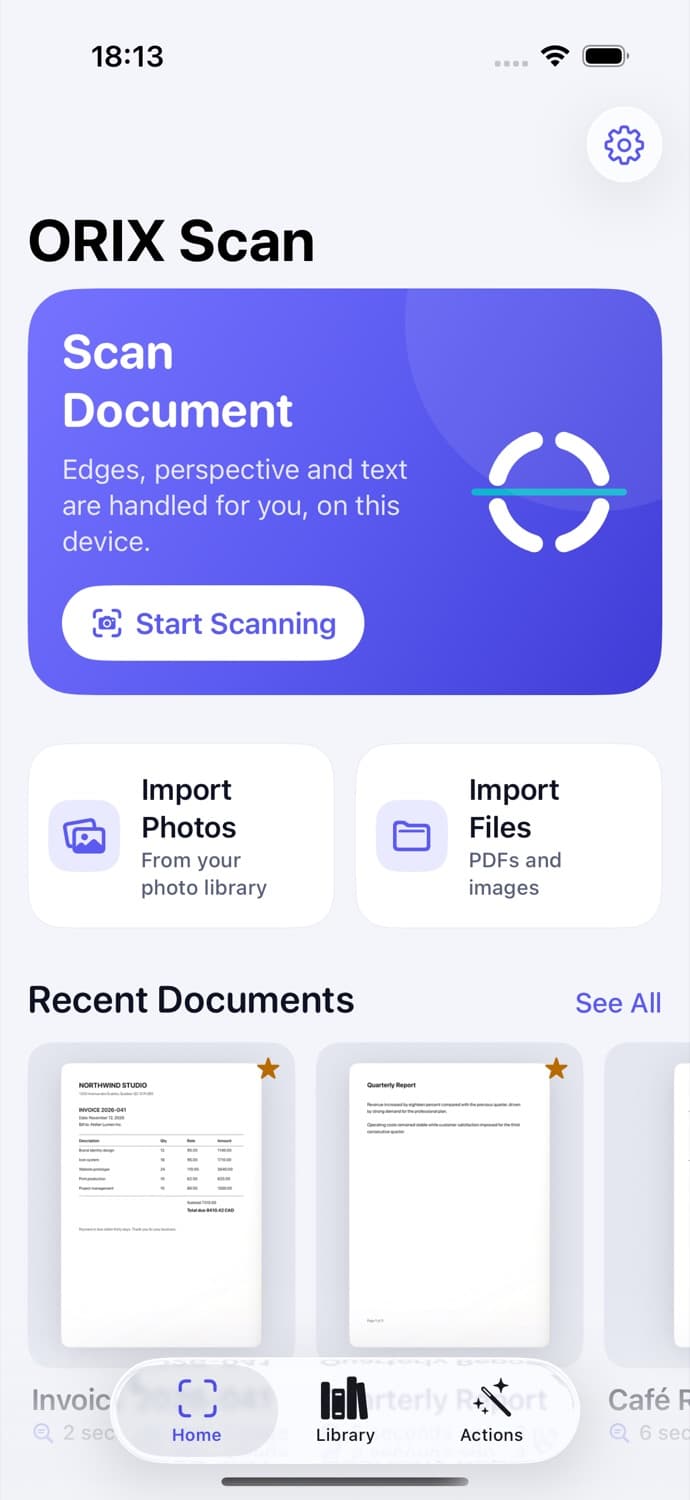
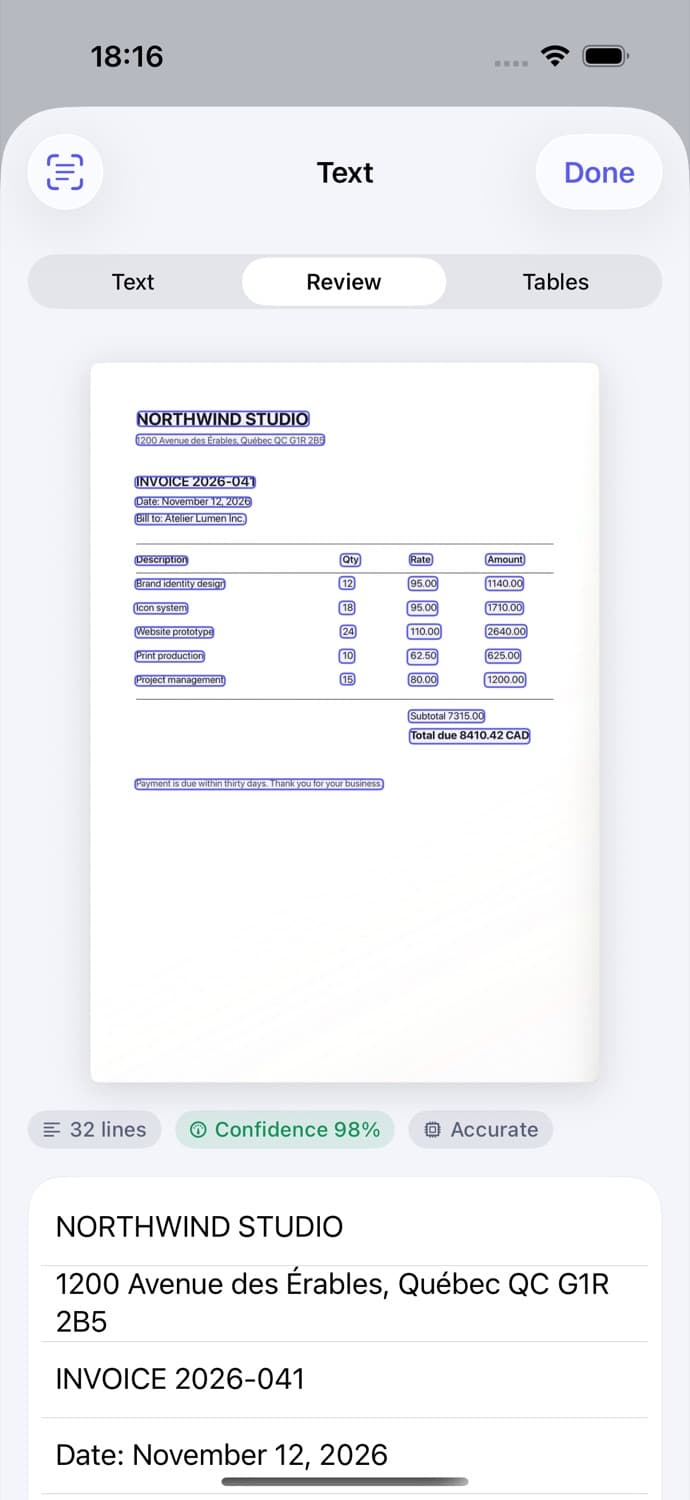
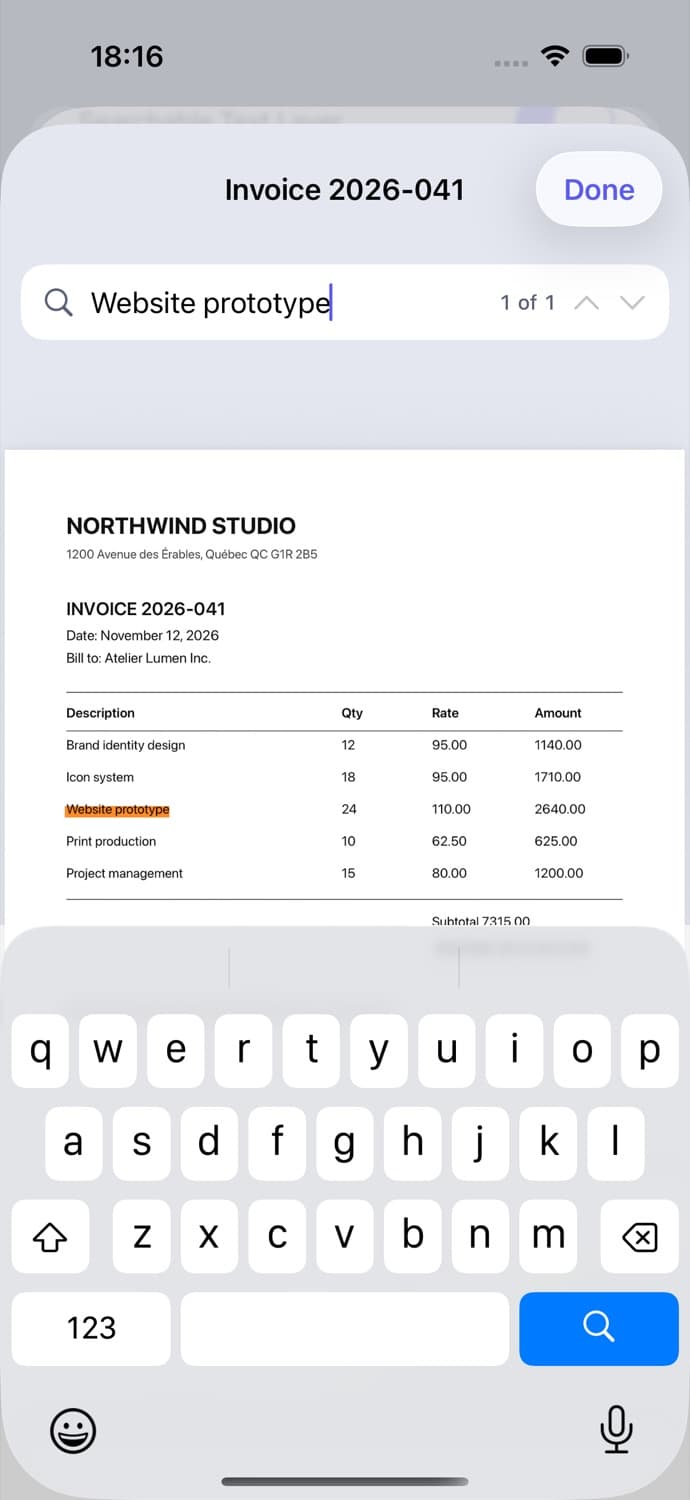
Home: Scan Document first, photo and file imports below, then recent documents. Page editor: before / after split with the Colour filter flattening a shadow on a letter. Text review: recognized lines boxed over an invoice, with line count, confidence and mode. Searching inside the exported PDF: the match is highlighted on the page. Export: three quality presets with their measured file sizes, searchable text layer, page size and password options. Tables: an invoice table rebuilt from text positions, ready for CSV export, with a reminder to check it. ORIX Actions: presets such as Scan to PDF and Scan to Searchable PDF, shown as chains of steps. The Home screen in dark mode. iPad workspace: sidebar, page rail and a large editor with the before / after comparison. iPad library: document grid with folders, favourites, Recently Deleted and search across titles and text.
A closer look
Recognition that stays on the device
Text is read by Apple's Vision framework on the device; there is no remote OCR and no way to enable one, because the app has no networking code. Recognized lines are drawn over the page, low-confidence lines are flagged, and each line can be corrected or reverted. Results are tied to the page geometry, so changing the crop or rotation discards stale text. Handwriting is not offered as a feature.
PDFs you can actually search
Each exported page keeps the scanned image and carries invisible text placed word by word, so search hits land on the right words. The project's tests read generated PDFs back with PDFKit and compare the position of each hit against the recognized word. Imported pages that already contain text are copied untouched rather than rasterized.
File sizes measured, not promised
Maximum Quality, Balanced and Small File Size are built for real and the app shows the size each one produces. It states plainly that a smaller preset does not always produce a smaller file. After every preset, the tests rasterize the exported page and recognize it again to confirm it is still readable.
An iPad workspace, not a stretched phone
On iPad the app uses a sidebar for the library, folders, ORIX Actions and settings, a page rail and a large editor. Drag and drop works in and out, and keyboard shortcuts cover scanning, importing, exporting and switching sections.
Technical specifications
- Platform
- iPhone (iOS) · iPad (iPadOS)
- Minimum OS
- iOS 18.0 · iPadOS 18.0
- Architectures
- Not verified yet
- Current version
- 1.0.0 (1)
- Release date
- November 20, 2026
- Exported build size
- 2.9 MB
- Permissions
- Camera — requested only when the scanner opens
- Face ID / Touch ID or passcode — only if you turn on the optional App Lock
- Photos — no permission needed; the system photo picker is used
- Offline
- Fully offline. The app contains no networking code; capture, enhancement, recognition, PDF generation and search all run locally.
- Languages
- English · French (Canada)
- Dependencies
- None. Apple frameworks only (SwiftUI, VisionKit, Vision, Core Image, PDFKit, SwiftData, App Intents, Core Spotlight, LocalAuthentication).
- Bundle identifier
- ai.spboucher.orix.scan
Downloads
TestFlight beta
Build 1.0.0 (1) is processed on TestFlight for the developer's internal tester group only. It has not been submitted to Beta App Review, so no public invitation is open yet, and nothing has been submitted to the App Store.
Beta Access Coming Soon
A build is in TestFlight for internal testing. A public invitation has not been opened yet.
Not on the App Store yet.
Release data synchronized with SPB Git on November 21, 2026.
Release history
1.0.0 (1)
TestFlight · internal testingTag v1.0.0-build1- First build uploaded to TestFlight and processed; available to internal testers only.
- Source published in the public orix-scan repository (tag v1.0.0-build1).
Privacy
No account, no upload, no tracking. Documents never leave the device unless you share them; the prepared App Store privacy label is "Data Not Collected".
- No networking code in the app or its package, and no third-party SDK.
- No analytics, no advertising; the privacy manifest declares no tracking and no collected data.
- Files are encrypted at rest by iOS data protection (complete until first user authentication).
- Optional App Lock with Face ID, Touch ID or passcode; a cover hides content in the app switcher.
- The password of an imported protected PDF is not stored; temporary export files are emptied at launch.
- The app writes no logs containing document content.
Verification status
Not yet validated on a physical device
79 package tests passed on the Mac host (real Vision, PDFKit, Core Image, SwiftData); 13 UI tests passed on the iPhone 17 Pro simulator and 13 on the iPad Pro 13-inch simulator (iOS 26.5). One unexplained test-harness failure occurred in a third iPad run and did not reproduce. Code coverage was not measured.
Never run on a physical iPhone or iPad. The camera scanner has never been displayed (the Simulator has no camera), and Face ID / Touch ID, VoiceOver, background continuation and real performance are unverified on hardware. OCR accuracy figures come from a synthetic corpus of rendered pages, not photographs of paper. French screens other than Home and Library were not individually reviewed. All screenshots are Simulator captures of sample documents.
Questions
Can I install ORIX Scan today?
Not publicly. Build 1.0.0 (1) is on TestFlight for the developer's internal testers only; it has not been submitted for external testing or to the App Store. The source can be built with Xcode from the public repository.
Is my document sent anywhere for text recognition?
No. Recognition is Apple's Vision framework running on the device, and the app contains no networking code at all.
Which languages can it read?
English, French and the other languages your version of iOS supports. The list is read from Vision at run time and depends on the recognition mode; nothing is hard-coded.
Does it read handwriting?
Handwriting is not offered as a feature: it has not been validated on real handwriting samples.
How accurate is the text recognition?
On a synthetic corpus of 17 rendered pages, Accurate and Automatic modes had a character error rate between 0.0 % and 1.1 %; Fast mode was unreliable on receipts, low resolution, blur and script fonts. These pages are not photographs of paper, and no measurement on real paper exists yet.
Is there iCloud sync?
No. Version 1.0 has no iCloud sync, no Apple Pencil annotation and no widgets, and folders are one level deep.
More from ORIX
See the full catalog Available
ORIX Sheet
A native Mac spreadsheet with 473 tested functions, an embedded data engine, charts, statistics and local Python. No account.
MacProductivityv1.0.0 Available
ORIX Docs
A native Mac word processor with real pagination, styles, equations, citations, track changes and DOCX and PDF exchange. No account.
MacProductivityv1.0.0 Beta
ORIX Calc
Standard, scientific, financial, graphing, math, statistics, units and a reactive notebook on one exact engine, fully on device.
iPhoneiPadUtilitiesv1.0.0