ORIX Secure
Security Checks & Cleanup
Development build
Overview
ORIX Secure is a security, privacy and storage companion that tells you the truth about your device. It is not an antivirus. iOS isolates every app, so no App Store app can scan an iPhone for malware. ORIX Secure shows you what an app can really check, guides you through what only you can see in Settings, and never invents a result.
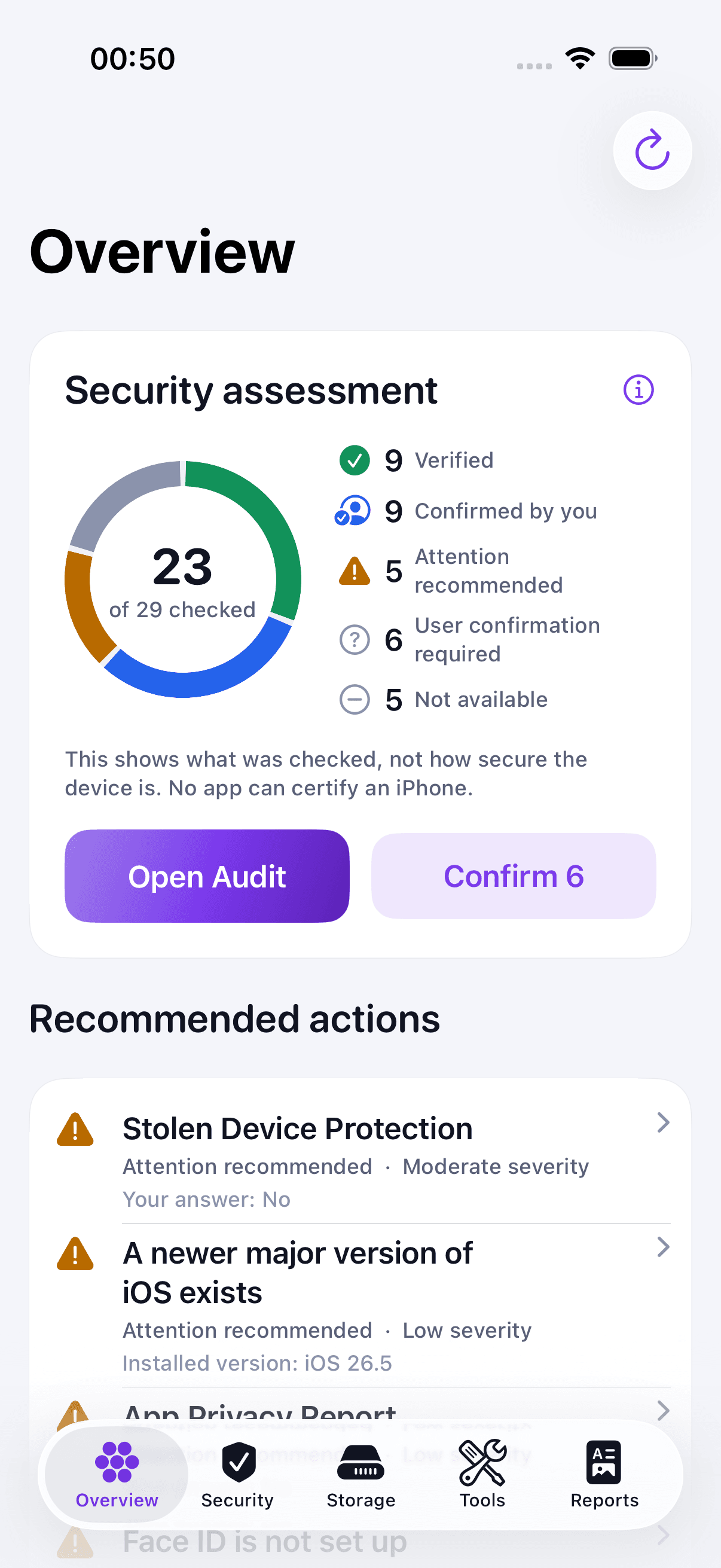
Every result names its evidence, the API or method behind it, its confidence and what was not inspected. There is no security score: you see what was verified, what you confirmed, what needs attention and what cannot be assessed. Nothing is deleted without your selection and your confirmation, and freed space is measured, not announced.
Concretely: a security audit of the facts iOS exposes, a guided checklist for the settings it hides, a privacy audit, offline analysis of links, QR codes and files, network diagnostics against hosts you choose, photo and file cleanup, device, battery and performance readings, guided investigations, reports in four formats and reusable workflows. ORIX Secure is still in development and has not yet run on a physical iPhone or iPad.
Key features
- 01
Security audit
Reads the facts iOS exposes: passcode, Face ID or Touch ID, Secure Enclave, data protection, signs of system modification, time since the last restart. Each finding carries its evidence, source and confidence.
- 02
Guided checklist
Guides you through the settings apps cannot read — updates, Stolen Device Protection, Find My, two-factor authentication, profiles — and records your answers as yours. Answers expire and are shown as confirmed by you, never as verified.
- 03
Privacy audit
Shows ORIX Secure's own permissions with their purpose, states what the app does with data, and walks you through a privacy checklist of 16 settings. A denied permission is your choice, not a finding.
- 04
Link and QR code analyser
Paste a link, share it from another app or scan a QR code, and see where it really goes: look-alike domains, Punycode, hidden redirects, IP addresses, encoding tricks. Works offline. The link is never opened and never sent anywhere.
- 05
File scanner
Real file type from the file's bytes, extension mismatch and SHA-256, plus archive and PDF structure without opening or running the file. It is not a malware scanner: no signature database is consulted.
- 06
Network Lab
Connection type, proxy, VPN indicator and Wi‑Fi security type; DNS, connection time and certificate details for a host you choose; services announced on your local network.
- 07
Photo and file cleanup
Exact duplicates, similar photos, screenshots and large videos. Sizes are measured, or shown as not measured — never guessed. Nothing is deleted without your selection and your confirmation.
- 08
Device, battery and performance
What iOS lets an app measure — and a plain list of what it does not (battery health, temperature, other apps' memory). No “RAM booster”: they do not exist on iOS.
- 09
Investigations, reports and workflows
Eight guided investigations put ordinary causes first, with proportionate next steps. Any result can be saved as a report and exported as PDF, Markdown, JSON or text; reusable workflows chain the checks you run regularly.
Screenshots
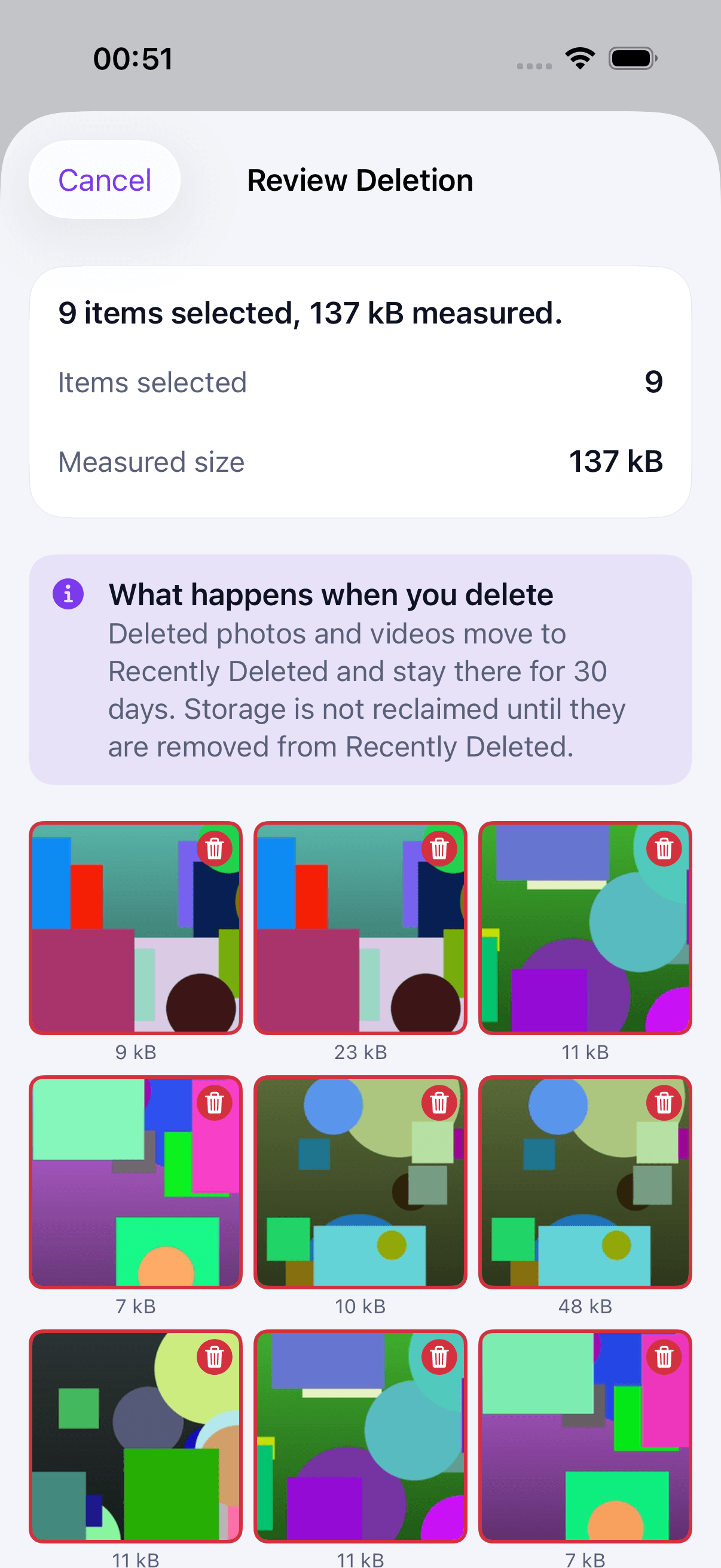
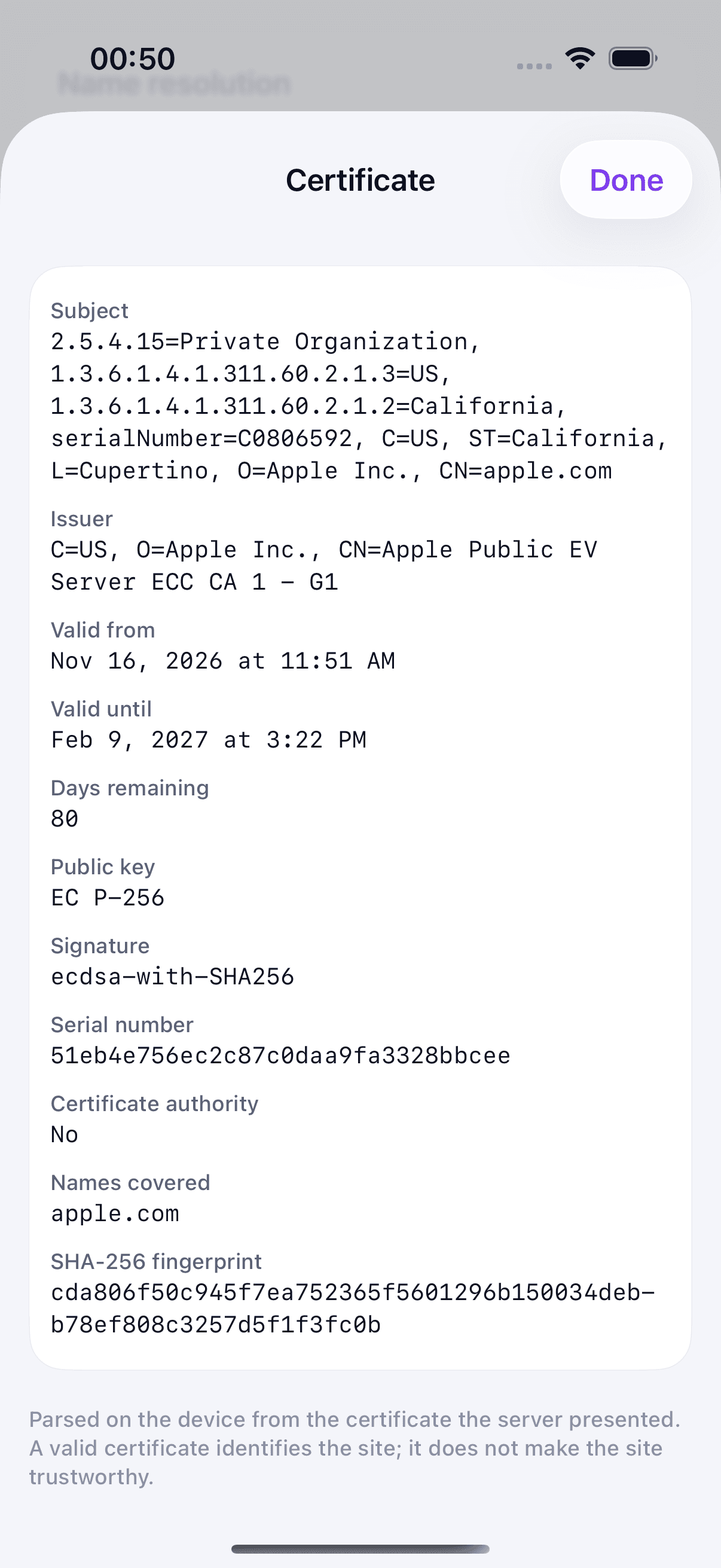
The Overview tab counts findings by state and lists recommended actions, with a reminder that it shows what was checked, not how secure the device is. The Security Audit screen with counts by state and entry points to the Security Checklist, the Privacy Audit and Investigations. The Security Checklist lists settings only the user can confirm, each with its path in Settings. The Privacy Audit summarises confirmed and unchecked settings and lists the app's own permission states. The Link Analyser rates a Punycode look-alike address as High and shows the real destination domain next to how it is displayed. Photo Cleanup after a scan of sample images: exact duplicates and similar photos, each with its measured size. The Review Deletion sheet shows the selected sample images with their measured sizes and explains what happens when they are deleted. Network Lab's certificate sheet for apple.com: subject, issuer, validity dates, public key and SHA-256 fingerprint, parsed on the device.
A closer look
Three sources, kept apart
Findings checked by the app are read from documented APIs, each with its source. Settings iOS hides from apps — 19 for security and 16 for privacy — are checked with you: the app gives the reason and the path in Settings, and stores your answer as reported by you. What cannot be assessed is listed in the app and in every report. The overview shows counts by state and coverage, with the line “This shows what was checked, not how secure the device is.”
Link analysis with a published method
The analyser shows the registrable domain, sub-domains, scheme, port, path and parameters, with Punycode and displayed forms side by side. It looks for 35 kinds of signals, each with evidence and an explanation that includes the benign reading. The level is the sum of signal weights: low, elevated or high. Few or no signals is not proof that a link is harmless: the page itself is not inspected, and no reputation data is used.
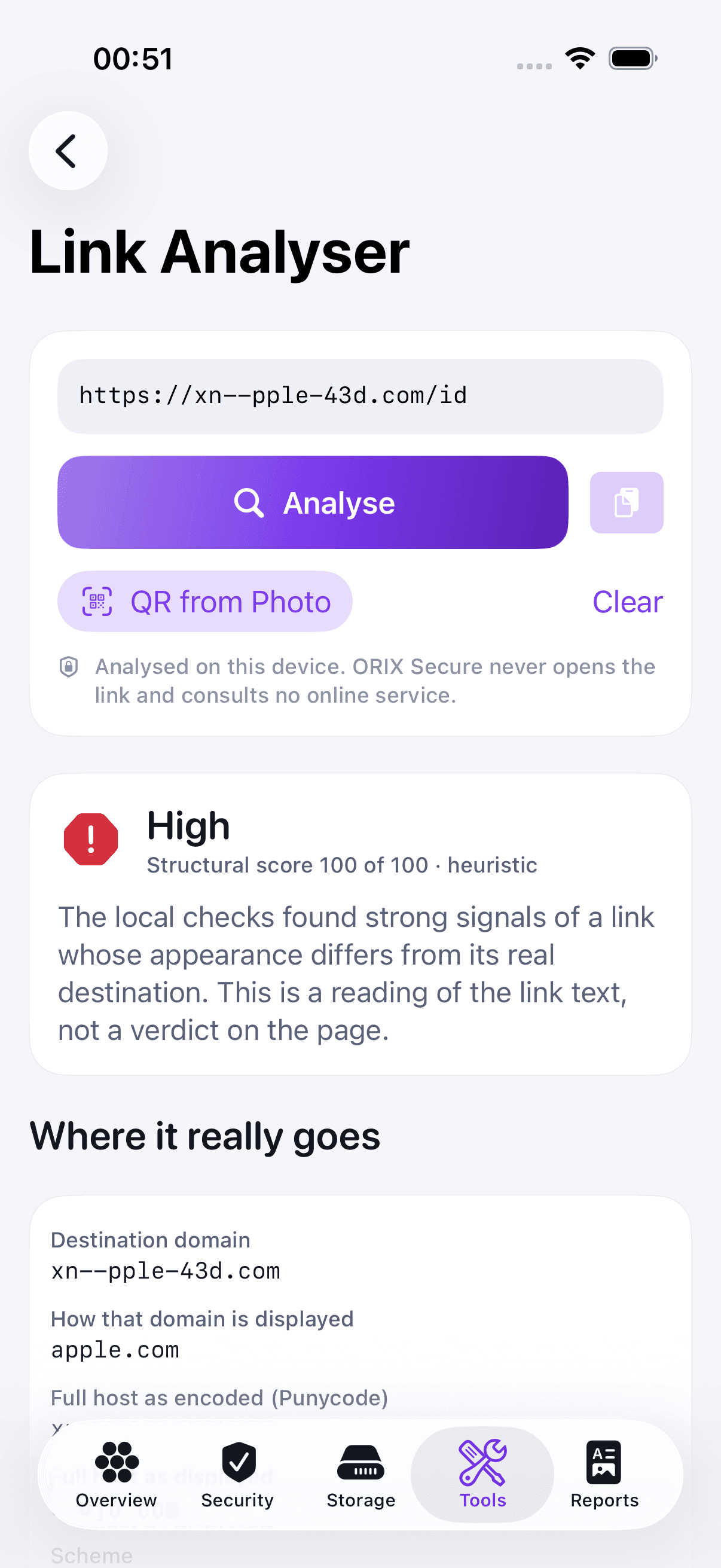
Photo cleanup that never guesses a size
The library is scanned in batches from small previews, with a persistent fingerprint cache so later scans only process what changed. Candidates are then measured exactly; originals stored only in iCloud are not downloaded and are shown as not measured. Only the extra copies of exact duplicates are pre-selected. Deletion takes two confirmations — the app's review sheet, then iOS's own dialog — and the result is verified by re-reading the library.
Network Lab: a host you choose, nothing else
For a host you enter, the app resolves DNS, times five TCP connections, and reports the TLS version, cipher suite, the system's trust verdict and the certificate chain, parsed on the device. Wi‑Fi security type requires Location permission, as Apple mandates; the app asks only there and never reads a position. It does not intercept traffic, install a VPN or inspect the router.
Technical specifications
- Platform
- iPhone (iOS) · iPad (iPadOS)
- Minimum OS
- iOS 18.0 · iPadOS 18.0
- Architectures
- arm64
- Current version
- 1.0.0 (1) — not released
- Release date
- Not released
- Exported build size
- 6.2 MB
- Permissions
- Photos — for Photo Cleanup; limited access works and is labelled as partial coverage.
- Camera — to read a QR code; a QR code can also be read from a photo without this permission.
- Location (when in use) — required by Apple to read the Wi‑Fi security type; no position is read or stored.
- Local network — only when you start a local network scan.
- Face ID — only if you turn on the optional App Lock.
- Offline
- The core works offline. Network connections happen only when you start a probe in Network Lab, to the host shown on screen; link analysis, file inspection, photo analysis and reports make none.
- Languages
- English · French (Canada)
- Dependencies
- No third-party code. Swift 6, SwiftUI, SwiftData and Apple frameworks, organised in eight local Swift packages.
- Bundle identifier
- ai.spboucher.orix.secure
- Source
- Private repository
Downloads
TestFlight beta
Archived and exported for App Store Connect; no upload is documented.
Beta Access Coming Soon
No public TestFlight invitation exists yet.
Not on the App Store yet.
Release history
No release has been recorded yet.
Privacy
No account, no server, no analytics, no advertising and no third-party SDK. Results stay on your device unless you export them.
- Data Not Collected: the privacy manifest declares no tracking and no collected data.
- Permissions are requested where they are used, never at launch; each feature degrades cleanly without its permission.
- Reports, checklist answers, workflows and a photo-fingerprint cache stay in the app's container. Analysed links are not kept unless you turn the option on.
- Exports are redacted by default: addresses, network names, personal paths and URL queries are masked. Reports never carry the device name or a serial number.
- The share extension “Analyse Link” analyses the shared link offline, makes no network request and stores nothing.
- App Lock (Face ID, Touch ID or passcode) is optional and off by default.
- Permission prompts and the file-protection class of stored data have not been verified on a physical device.
Verification status
Not yet validated on a physical device
379 engine tests passed on the Mac across eight suites. 22 UI tests passed on the iPhone simulator (iOS 26.5) on 2026-11-21; the iPad simulator result is not recorded in the project's documents.
Never run on a physical device. Battery readings, Secure Enclave, App Attest, data protection, jailbreak-path checks, camera QR scanning, Wi‑Fi security type, the Local Network prompt and App Lock with real biometrics were compiled and, where possible, exercised in the Simulator only. Only iOS 26.5 was exercised, although the deployment target is iOS 18.0. Performance was measured on the development Mac only, and accessibility was not audited by a person.
Questions
Is ORIX Secure an antivirus?
No. iOS isolates every app, so no App Store app can scan an iPhone for malware or certify that a device is free of compromise. ORIX Secure shows what an app can really check and says what it cannot.
Why is there no security score?
A single number hides what was checked. The app shows what was verified, what you confirmed, what needs attention and what cannot be assessed, along with how much was looked at.
Can it delete photos or files on its own?
No. Nothing is deleted without your selection and your confirmation. Photo deletion takes two confirmations, and deleted photos move to Recently Deleted, where space is reclaimed after 30 days or when you empty that album.
Is a link I analyse opened or sent to a server?
No. Link analysis works offline; the link is never opened and never sent anywhere. For the same reason the page itself is not inspected, and no reputation data is used.
Can it show battery health or free up RAM?
No. iOS does not let apps read battery health, cycle count or temperature, or touch other apps' memory. The app lists these as not available and says where iOS shows them, when it does.
Can I install ORIX Secure today?
No. Version 1.0.0 (1) has been archived and exported, but no TestFlight upload is documented, and the build has never run on a physical iPhone or iPad.
More from ORIX
See the full catalog Beta
ORIX Scan
Scan paper into clean, searchable PDFs: capture, enhancement, text recognition and export all run on your iPhone or iPad.
iPhoneiPadProductivityv1.0.0 Beta
ORIX Calc
Standard, scientific, financial, graphing, math, statistics, units and a reactive notebook on one exact engine, fully on device.
iPhoneiPadUtilitiesv1.0.0 Beta
ORIX Audio
A recorder and audio laboratory: frequency-coloured waveforms, spectrum, spectrogram, loudness in LUFS and on-device transcripts.
iPhoneiPadAudiov1.0.0