ORIX Monitor
System telemetry that says where each number comes from
v1.0.0 · macOS 15.0+
Overview
ORIX Monitor is a native macOS system monitor: CPU, GPU, memory, disks, network, power, thermal state and processes, sampled on a schedule and kept in a local history. Version 1.0.0 was published on 2026-11-21 as a disk image signed with a Developer ID and notarized by Apple, for Macs with Apple silicon.
Its guiding rule is to show only what macOS actually exposes. Every metric carries a quality label, such as measured, derived, estimate or best effort, and sensors that macOS does not publish through supported interfaces are listed as unavailable instead of being guessed.
The telemetry core is a separate Swift package with its own tests. The app on top of it has a customisable overview, detail pages per subsystem, a process explorer, stored history, findings, alerts, a report builder and a menu bar item. The interface is in English and Canadian French; the French text was machine-translated and spot-checked, and has not been proofread by a French-speaking reviewer. The source code is public.
Key features
- 01
Collectors for every subsystem
CPU load per core, memory accounting and pressure, swap, volumes and disk I/O, network interfaces, power and battery, thermal state and GPU devices are read by dedicated collectors in the core package.
- 02
A quality label on every metric
A metric catalogue records the source and method of each stored value, and the interface shows whether it is measured, derived, an estimate or best effort.
- 03
Menu bar item and quick panel
A configurable menu bar item shows up to five indicators with mini charts and an alert dot, and opens a quick panel. Closing the main window leaves it running.
- 04
Local time-series history
Samples are written to a local SQLite store with three retention tiers (raw, per minute, per hour), downsampled queries and gap shading. The History page covers ranges from one hour to one year, with metric comparison, bookmarks and PNG or CSV export.
- 05
Customisable overview
The overview is a grid of 14 live widgets that can be added, removed, resized and reordered by drag and drop. Three layouts are built in, your own can be saved, and a dashboard can be detached into its own window.
- 06
Process explorer
A sortable, searchable process table built on libproc, with an inspector showing the live history of the selected process and quit actions that ask for confirmation.
- 07
Threshold alerts
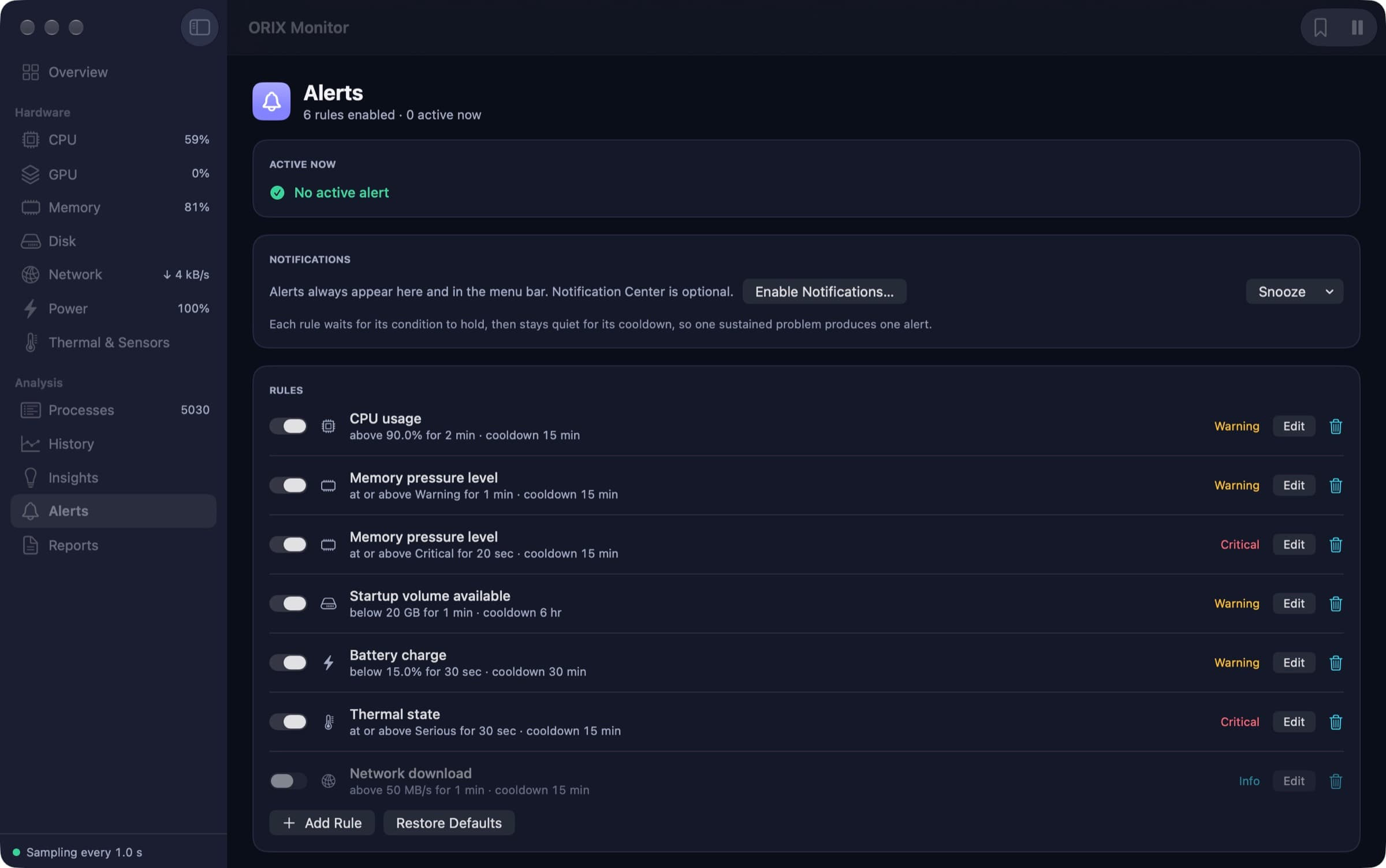
Alert rules combine a threshold, a hold duration and a cooldown, so one sustained problem produces one alert. Alerts can be snoozed; Notification Center is optional.
- 08
Findings backed by numbers
Seven detectors derive findings from stored history, such as sustained CPU usage, memory pressure, swap growth or disk exhaustion. Each finding carries the numbers it rests on and a suggested action.
- 09
Reports in four formats
The report builder produces system, CPU, memory, storage, network, process and incident reports from stored samples and exports them as PDF, Markdown, CSV or JSON. Two saved JSON reports can be compared.
Screenshots
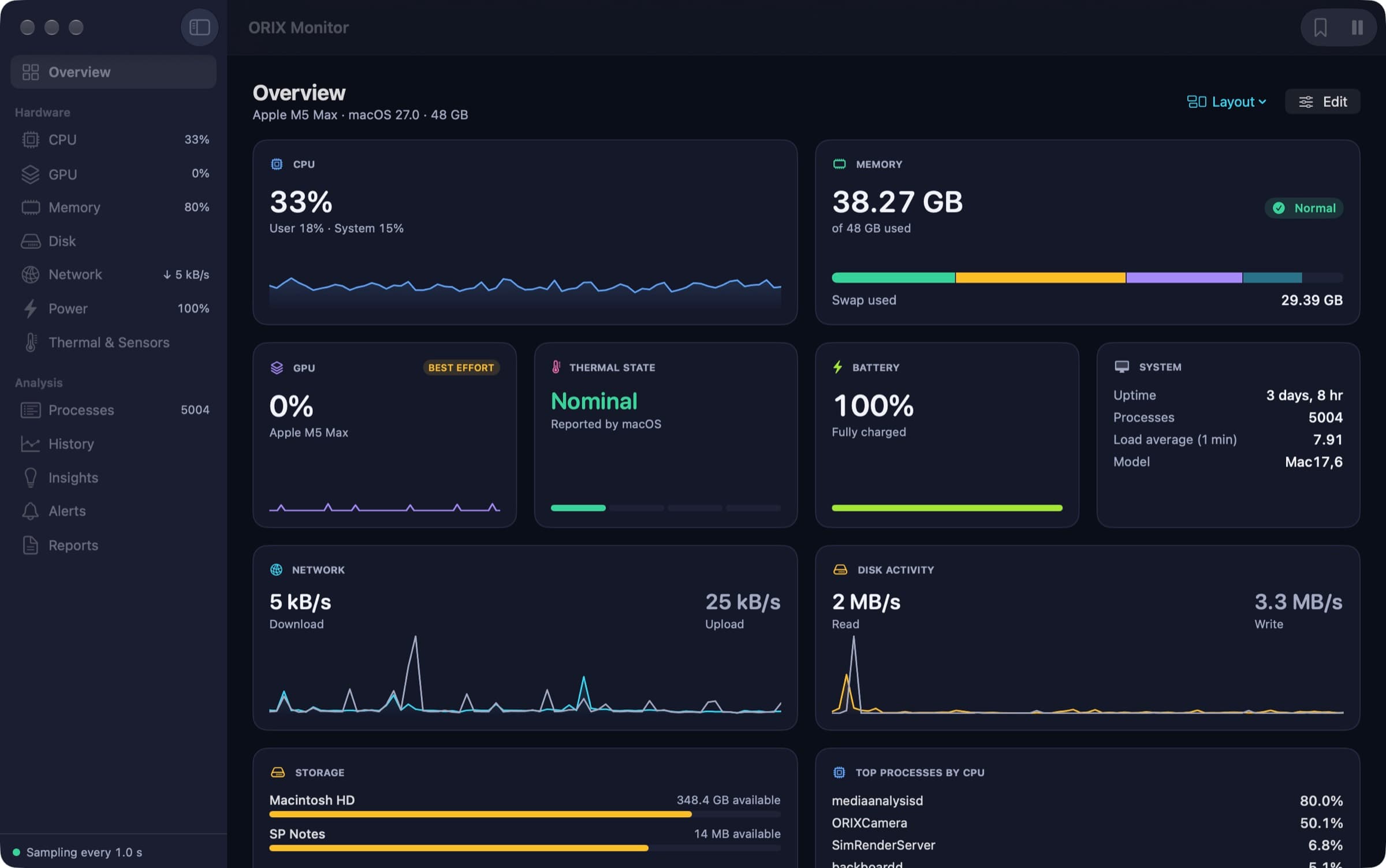
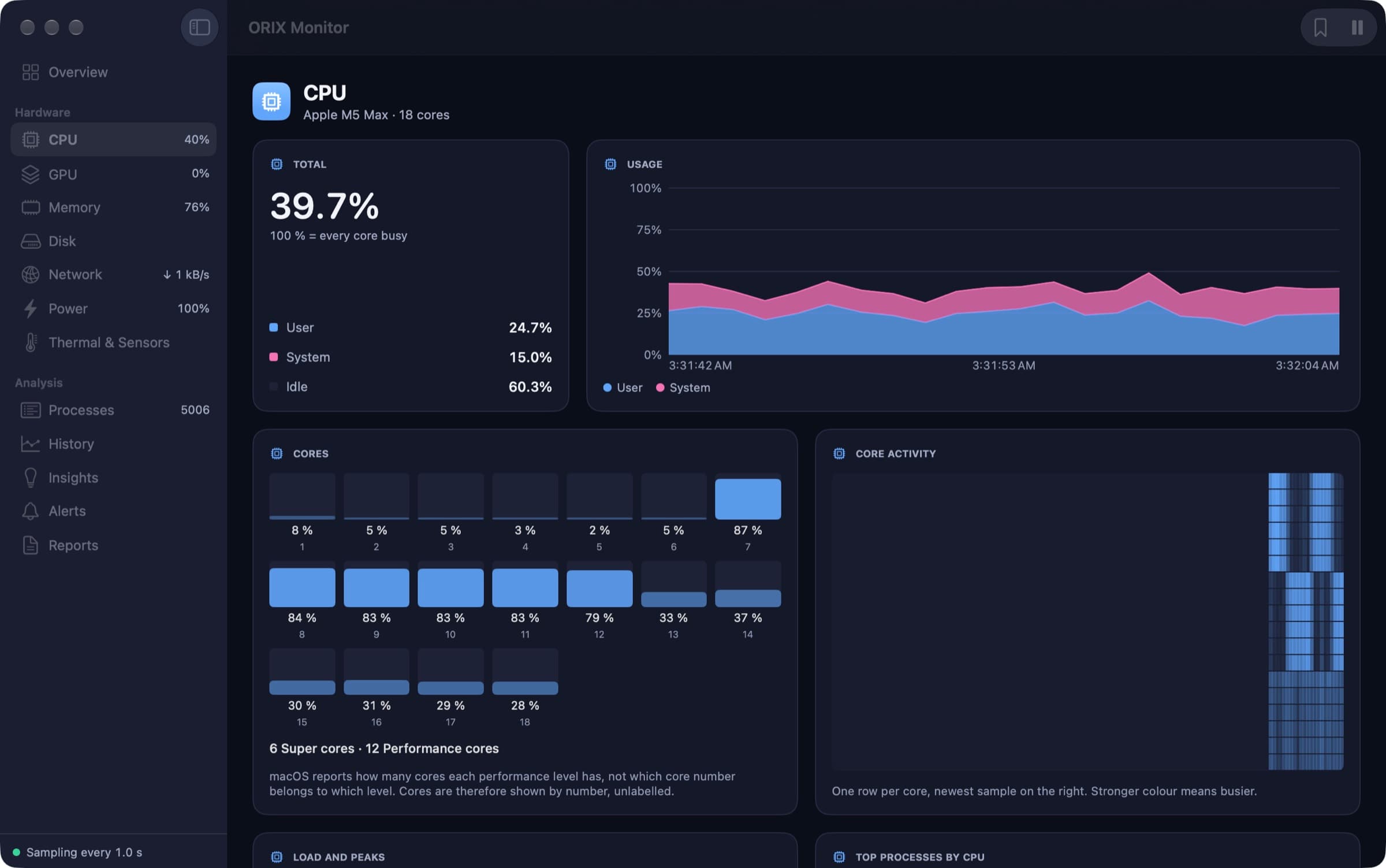
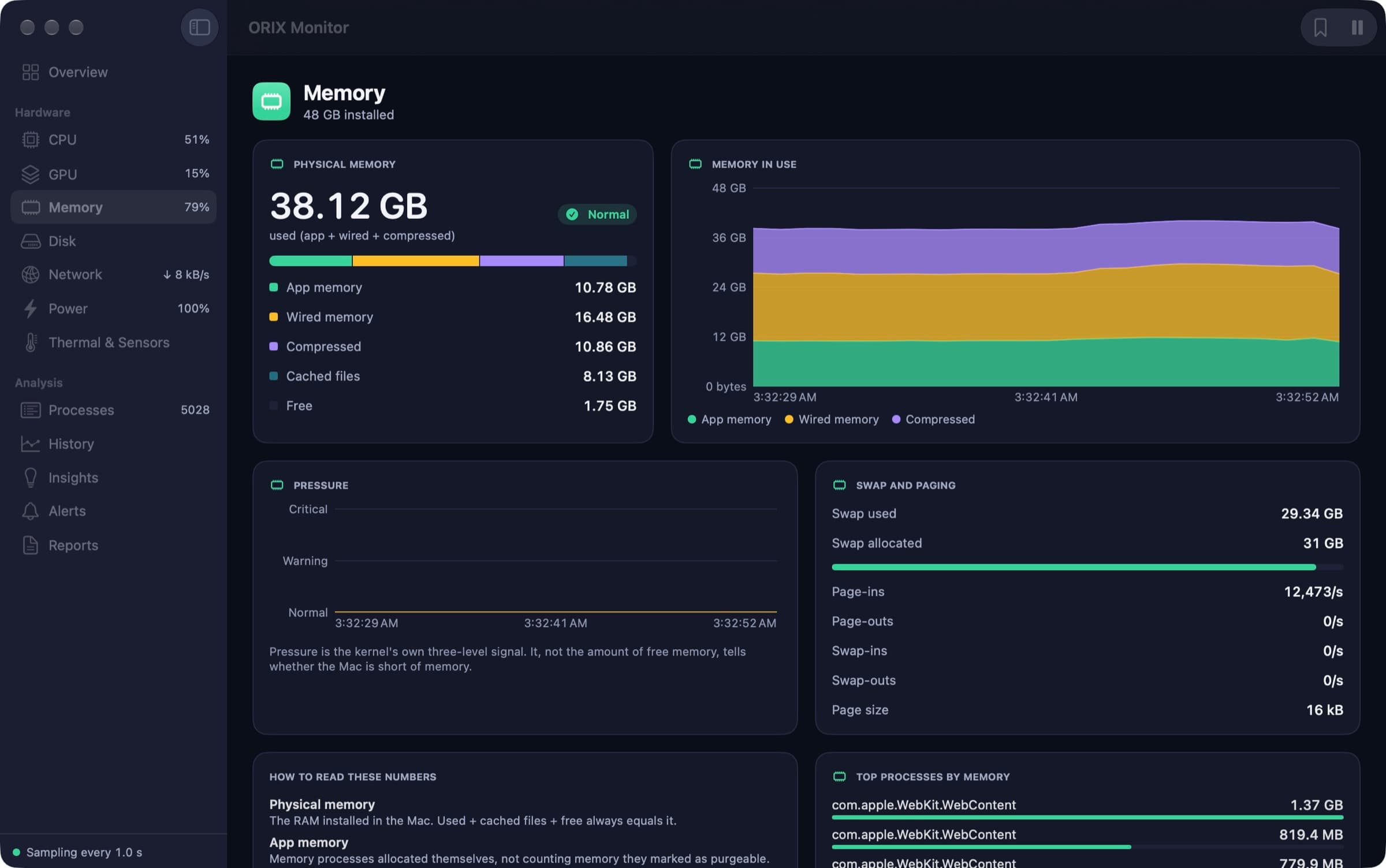
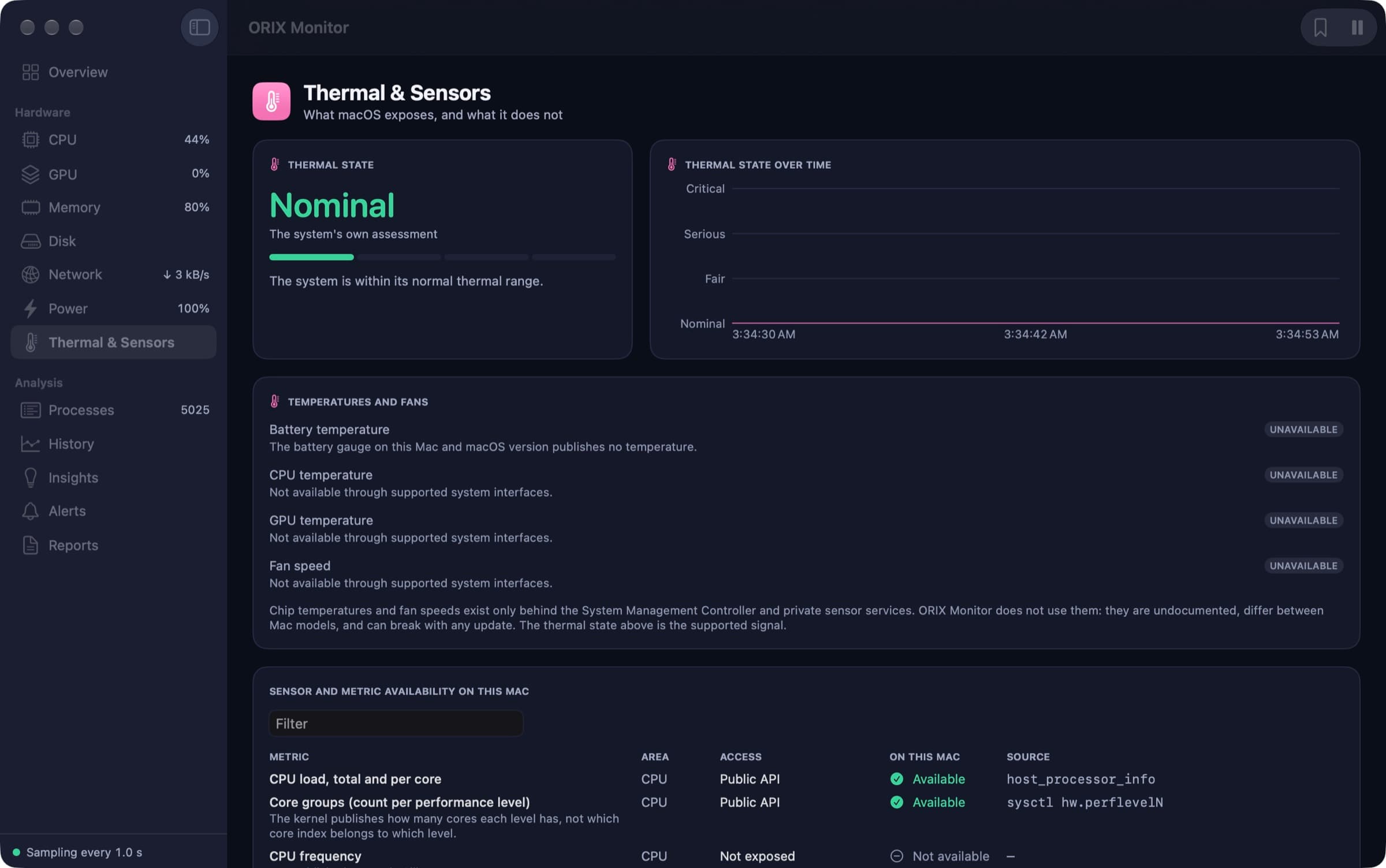
Overview in Dark Mode: CPU, memory, GPU, thermal state, battery, network, disk activity, storage and top processes. CPU page: total load split into user, system and idle, usage over time, per-core bars and the core activity heatmap. Memory page: physical memory breakdown, memory in use over time, pressure level, swap and paging rates. Thermal & Sensors page: thermal state reported by macOS, temperatures and fan speed marked unavailable, and the availability table for this Mac. Alerts page: no active alert, optional notifications with snooze, and rules with threshold, hold time and cooldown. History page: stored CPU usage over one hour with minimum, average, maximum, sample count and shaded gaps.
A closer look
Honest about what macOS exposes
CPU load comes from Mach per-processor tick counters, the process list from libproc, network counters from the kernel's interface list. Where macOS publishes only part of the picture, the app says so: it reports how many cores each performance level has, and shows cores by number because the system does not say which core belongs to which level.
Memory explained, not just counted
The Memory page breaks physical memory into app, wired, compressed and cached, tracks swap and paging rates, and plots the kernel's own three-level pressure signal. A short guide on the page explains how to read each figure.
Thermal state without private sensors
The supported thermal signal is the state reported by macOS, plotted over time. Chip temperatures and fan speeds sit behind undocumented services that differ between Mac models; the app does not read them and marks them unavailable, with a table of every metric's access path on the current Mac.
Alerts designed to stay quiet
Each rule waits for its condition to hold, then stays silent for its cooldown, so one sustained problem produces one alert. The alert engine is a pure state machine with no I/O, tested in the core package. Notification Center delivery is optional and was not exercised by the automated tests.
Technical specifications
- Platform
- Mac (macOS)
- Minimum OS
- macOS 15.0
- Architectures
- arm64
- Current version
- 1.0.0
- Release date
- November 21, 2026
- Download size
- 3.5 MB
- Permissions
- Notifications (optional): alerts always appear in the app and the menu bar; Notification Center is opt-in.
- Offline
- Works entirely on the Mac, with no account and no update check. The only network traffic it creates is the latency test, to a host the user types, when the user presses the button.
- Languages
- English · French (Canada)
- Dependencies
- No third-party package. The core uses system interfaces (Mach, libproc, IOKit, DiskArbitration) and SQLite.
- Bundle identifier
- ai.spboucher.orix.monitor
Downloads
macOS disk image
- Version
- 1.0.0
- Size
- 3.5 MB
- Requires
- macOS 15.0+
- Architecture
- arm64
- Released
- November 21, 2026
- Checksum verified against the SPB Git release
- Notarized by Apple — verified on this server
SHA-256
76ae76570e2c7654cdf377922bc85967d04eb20eedeaabd7675791f5b84e3be2
Not on the App Store yet.
Release data synchronized with SPB Git on November 21, 2026.
Release history
1.0.0 (1)
macOS downloadTag v1.0.0- First public release: tag v1.0.0, disk image and ZIP on git.spboucher.ai, source repository made public.
- Signed with a Developer ID, notarized by Apple (app and disk image) and stapled.
- Apple silicon only, macOS 15.0 or later; English and Canadian French.
- 81 core tests passed; 12 of 13 interface tests passed and 1 was skipped.
Privacy
Measurements are stored in a local database on the Mac. The app has a privacy mask and reports leave out identifying details by default.
- History is kept in a local SQLite store with configurable retention.
- A privacy mask hides addresses, host names and user names in the interface.
- Reports never contain the serial number, IP addresses or user names; including the host name is off by default.
- The only network traffic is the user-initiated latency test.
- The app is not sandboxed, because the sandbox blocks the process table and registry statistics it shows; it carries no entitlement and asks for no administrator password.
Verification status
Tested on physical devices
Per the release report of 2026-11-21: 81 core tests in 16 suites passed. Of 13 interface tests, 12 passed and 1 was skipped: the menu bar item is hidden behind the notch on the test Mac, so its existence and live title were checked but it was never clicked. Apple's automated accessibility audit ran on 12 pages and recorded 440 notes; none was resolved, and the contrast notes remain unexplained.
Developed and fully tested on one MacBook Pro (M5 Max, macOS 27.0). The final disk image was also installed on two Mac minis (M2 and M4 Pro, macOS 26.5.1), where it passed Gatekeeper, ran for 45 seconds and stored metrics. The published files were downloaded back: sizes and SHA-256 matched and Gatekeeper accepted the disk image. Not tested: macOS 15 (the declared minimum), a second display, a real sleep and wake cycle, notification delivery and the launch-at-login switch. No person has reviewed the app with VoiceOver, the French text has not been proofread, energy impact was not measured, and the cause of a memory swing between about 60 MB and 270 MB is not established. Screenshots are captures of the signed 1.0.0 build with the privacy mask on.
Questions
Where can I download it?
Version 1.0.0 is a 3.5 MB disk image on git.spboucher.ai, signed with a Developer ID and notarized by Apple. The source repository, orix-monitor, is public on the same forge. There are no automatic updates.
Which Macs does it run on?
It requires a Mac with Apple silicon and macOS 15 or later; there is no Intel build. macOS 15 is the declared minimum, but no Mac running macOS 15 was available for testing: the app was run on macOS 26 and 27.
Does it show CPU temperature and fan speed?
No. Those values exist only behind undocumented sensor services, which the app does not use. It shows the thermal state reported by macOS and marks the rest as unavailable.
What does “best effort” mean next to a value?
It is one of the quality labels attached to every metric. GPU utilisation, for example, is labelled best effort, and the remaining battery time is labelled an estimate.
Where is the history stored?
In a local SQLite database on the Mac, in three tiers: raw samples, per-minute and per-hour aggregates.
Is it available in French?
Yes. The interface is in English and Canadian French, with numbers and units formatted for the locale. The French text was machine-translated and spot-checked; it has not been proofread by a French-speaking reviewer.
More from ORIX
See the full catalog Available
ORIX Clean
A native macOS storage analyser and cleaner built around a mandatory preview; removed items go to the Trash.
MacUtilitiesv1.0.0 Available
ORIX Sheet
A native Mac spreadsheet with 473 tested functions, an embedded data engine, charts, statistics and local Python. No account.
MacProductivityv1.0.0 Available
ORIX Docs
A native Mac word processor with real pagination, styles, equations, citations, track changes and DOCX and PDF exchange. No account.
MacProductivityv1.0.0