ORIX DJ
Mix the Music. Program the Experience.
v1.0.0 · macOS 15.0+
Overview
ORIX DJ is written for the Mac, not ported to it. The audio engine, the time stretcher, the eighteen effects, the track analysis, the Metal waveforms and the automation language are first-party Swift on top of Apple frameworks, with no third-party code. What sets it apart is ORIX Script: a transition, a build-up or a whole routine is a short text file timed in beats and bars, checked by a compiler before it can touch the mix, and executed on the exact sample. The same script runs identically in the simulator and on the live engine. Version 1.0.0 is signed and notarized. Its sound has been measured but not yet judged by ear, and it has not been tried with a MIDI controller.
Key features
- 01
Two or four decks
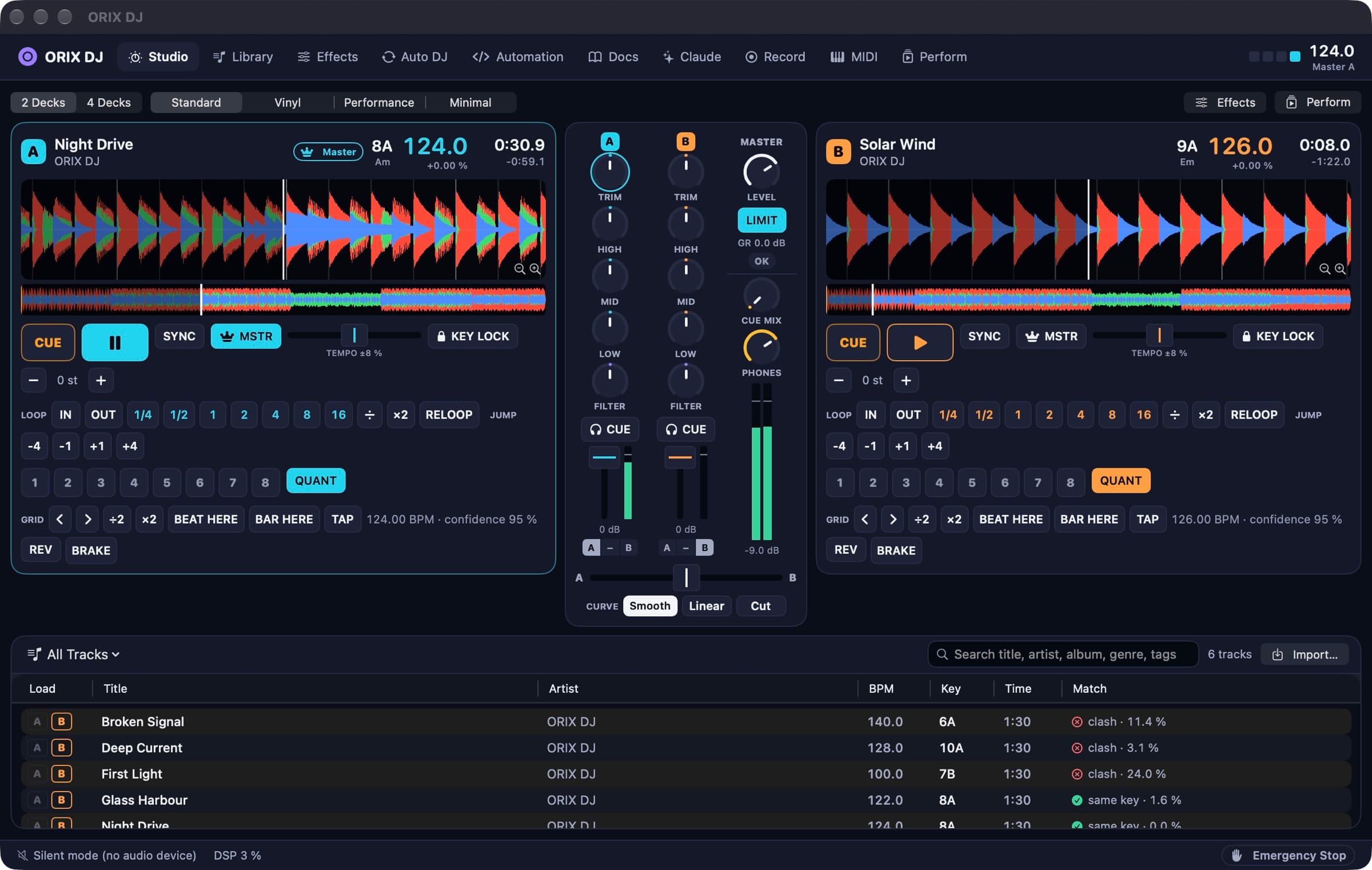
Varispeed, key lock, key shift, sync to the master deck, quantize, loops, eight hot cues, reverse and brake. Tracks are decoded to memory, so seeking and loops never wait for the disk.
- 02
Its own audio engine
A Core Audio render graph with no allocation and no lock on the audio thread. Control changes are timestamped and applied on the exact sample.
- 03
Metal waveforms
Scrolling three-band waveforms with beat grid, cues and loops, zoom from 1 to 32 seconds, and a whole-track overview.
- 04
Mixer
Trim, three-band EQ with full kill, one-knob filter, faders, crossfader, cue bus, and a look-ahead limiter whose meter shows the real gain reduction.
- 05
Eighteen effects
Reverb, delay, echo, flanger, phaser, chorus, tremolo, auto-pan, three filters, gate, compressor, limiter, distortion, bitcrusher, beat repeat and noise: three slots per deck and a master rack.
- 06
Tempo, key and loudness
Each imported track gets a beat grid, a key in musical and Camelot notation, a BS.1770 loudness and its waveform. Beat grids have a constant tempo.
- 07
ORIX Script
A typed language with units (dB, Hz, ms, beats, bars), waits, ramps with curves, scheduled blocks, events, functions and bounded loops. No file access, no network, no unbounded loop.
- 08
Automation Studio
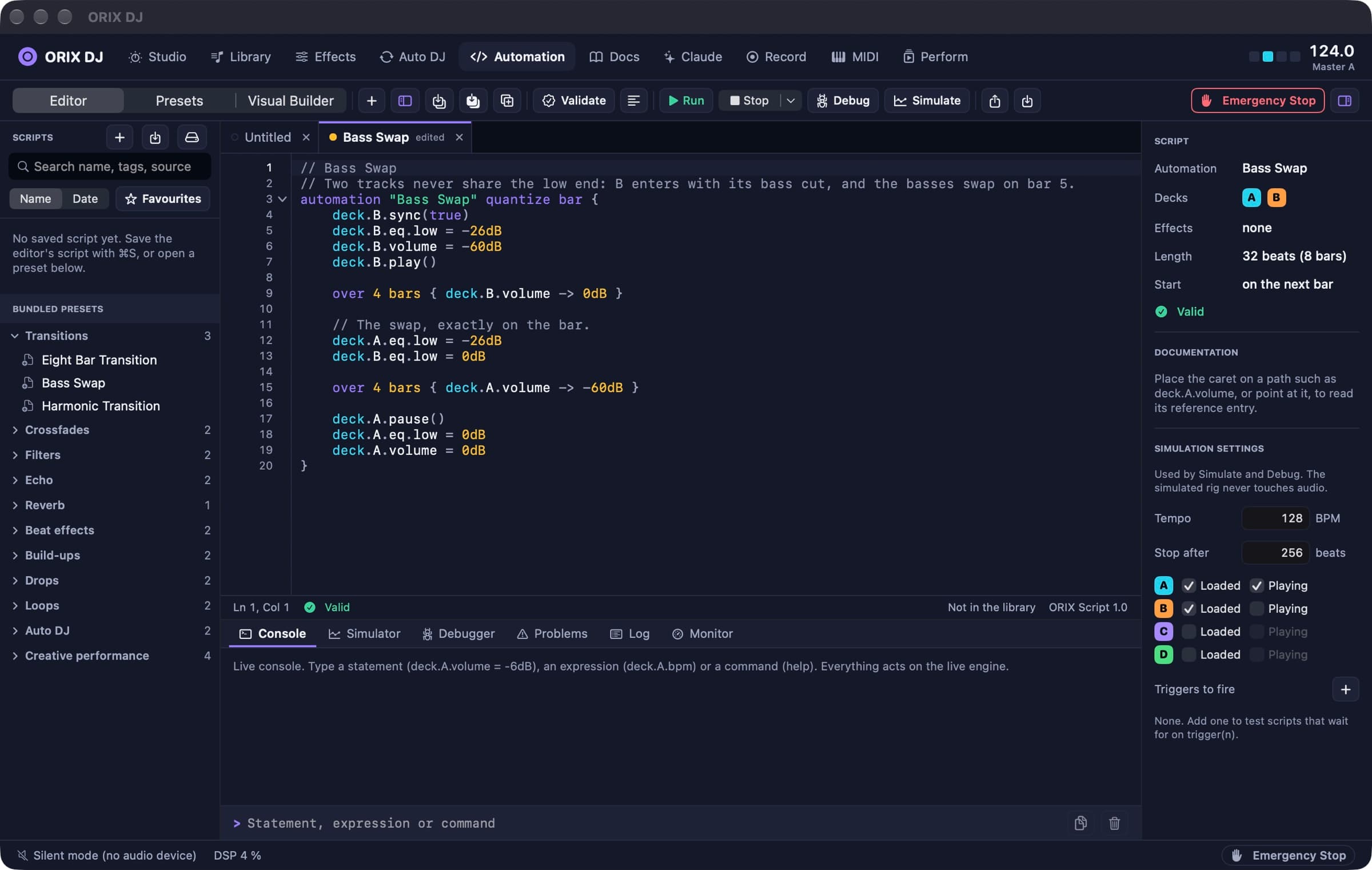
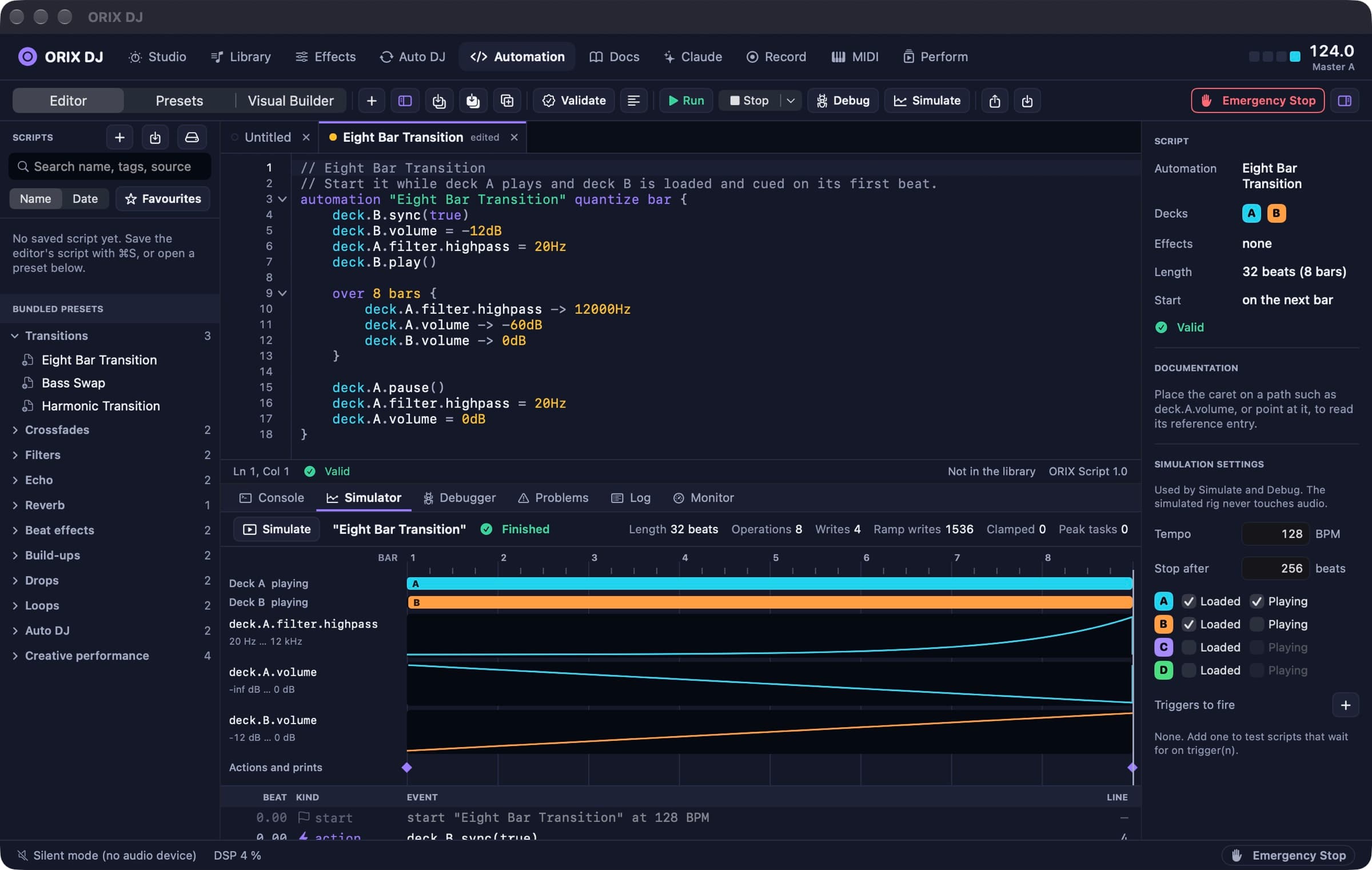
A native editor with completion, problems as you type, a formatter, version history, a console, a simulator that draws what a script would do, and a debugger with breakpoints.
- 09
Twenty-four presets and a visual builder
Transitions, build-ups, echo outs, loop rolls and more, each a readable script. The visual builder assembles a script from blocks and shows its source.
- 10
Auto DJ without AI
Chooses the next track by tempo and harmonic compatibility and writes each transition as an ORIX Script you can read and edit. Deterministic.
- 11
Library
A local database of your own files: import, analysis, search, crates, playlists, smart crates and history. Files stay where they are.
- 12
Recording, MIDI, projects
Record the master on demand with a visible indicator and export to WAV, AIFF, AAC, ALAC or FLAC. Core MIDI with learn and mapping profiles. Projects save the whole rig.
- 13
Docs inside the app
Twenty-nine chapters and fourteen worked examples, offline and searchable, with a Run button on every example.
- 14
Claude Studio, optional
With your own Anthropic API key, an assistant writes, explains and repairs ORIX Scripts. Generated code is compiled and shown, never run automatically.
Screenshots
The studio: two decks with Metal waveforms, the mixer and the library. The same studio in the light appearance. Four decks. Automation Studio: the ORIX Script editor. The simulator draws what a script would do, bar by bar. The debugger: breakpoints, stepping, variables. The effects rack. The library, with demo tracks synthesized by the app. Auto DJ: the queue and the planned transitions. The Docs tab: the whole manual, offline. Performance mode.
A closer look
A mix written in beats and bars
An ORIX Script says what should happen and when, in musical time: raise a filter over eight bars, start a one-beat loop on bar seven, start the other deck on the drop. The compiler checks types, units, ranges and the list of controls a script may touch, and refuses unbounded loops and recursion before anything runs.
No script code on the audio thread
A dedicated scheduler thread runs scripts 30 ms ahead and sends timestamped changes through a lock-free queue; the render thread splits its buffer and applies each change on its sample. Measured on a MacBook Pro M5 Max with four decks, key lock, fourteen effects and the limiter: 560 timed commands, none late, and no overload at 256 frames over a 20-second run on a real output device.
See it before you play it
The simulator runs a script on a simulated rig, faster than real time, and draws every parameter change on a timeline in bars. The debugger adds breakpoints, stepping and inspection. Both use the same runtime as the live engine.
Measured, and said so
The engine is covered by 241 automated tests (91.6 % line coverage of the core) and 9 interface scenarios. Two synced decks stay within 0.021 ms of each other; key lock holds pitch within 0.04 cents. Rendering four decks with key lock, fourteen effects and the limiter takes 70.5 µs on average for a 256-frame buffer on an M5 Max, 1.3 % of the time available. These are measurements on one machine. Nobody has listened yet.
Technical specifications
- Platform
- Mac (macOS)
- Minimum OS
- macOS 15.0
- Architectures
- arm64
- Current version
- 1.0.0
- Release date
- November 21, 2026
- Download size
- 7.4 MB
- Permissions
- No entitlements — the app is not sandboxed and uses the Hardened Runtime
- No microphone access: recording captures the app's own master output only
- Keychain — only to store your Anthropic API key, if you enter one
- Music files and folders you choose to import
- Offline
- Mixing, analysis, automation and the documentation work offline. The only network code is the Anthropic client, used only when you ask Claude Studio for something with your own key.
- Languages
- English · French (Canada)
- Dependencies
- No third-party dependencies. Swift 6 and Apple frameworks only: SwiftUI, AppKit, Core Audio, AVFoundation, Accelerate, Metal, Core MIDI, SQLite.
- Bundle identifier
- ai.spboucher.orix.dj
Downloads
macOS disk image
- Version
- 1.0.0
- Size
- 7.4 MB
- Requires
- macOS 15.0+
- Architecture
- arm64
- Released
- November 21, 2026
- Checksum verified against the SPB Git release
- Notarized by Apple — verified on this server
SHA-256
ec9de1ab4f05c7f8ae7f5122202de6e9ee0ec8e92444e6f0b13941b984208ee2
Not on the App Store yet.
Release data synchronized with SPB Git on November 21, 2026.
Release history
1.0.0 (1)
macOS downloadTag v1.0.0- First public release: Apple Silicon build signed with a Developer ID, notarized by Apple and stapled.
- DMG, ZIP and SHA-256 checksums published on git.spboucher.ai.
- Not yet verified: sound quality by ear, MIDI hardware, multi-channel interfaces, the live Anthropic API, macOS 15.
Privacy
ORIX DJ works on your own files, on your Mac. It has no account, no analytics and no update check. Nothing is sent anywhere unless you use Claude Studio with your own API key.
- No account. No ads. No tracking. No crash reporting.
- Your music is never copied or uploaded; the library only references your files.
- Claude Studio sends your request, the language reference and the script you are working on directly to Anthropic over HTTPS. Audio is never sent; track titles are not sent unless you allow it.
- The API key is stored in the macOS Keychain only, and is never written to settings, projects or logs.
- Recording starts only when you press record, and a red indicator stays visible while it runs.
- Scripts cannot read files, open connections or run anything outside the language.
Verification status
Tested on physical devices
241 core tests in 44 suites and 9 XCUITest scenarios, all passing on debug builds (run of 2026-11-21). Core line coverage 91.6 %; the SwiftUI layer is not in that figure. The signed build was launched on three Macs.
Not verified: sound quality by ear, MIDI hardware, multi-channel audio interfaces, the live Anthropic API, macOS 15, VoiceOver, long sessions. The French interface has not been proofread.
Questions
Can I download ORIX DJ today?
Yes. Version 1.0.0 (1) is a disk image signed with a Developer ID and notarized by Apple, for Apple Silicon Macs with macOS 15 or later. It is a first release: read what has not been verified yet below.
Has the sound been evaluated?
Measured, not listened to. Timing, pitch, levels and load were measured, and two full transitions between real tracks were rendered without clipping or late commands. No one has judged the time stretcher or the effects by ear yet.
Does it work with my controller?
Unknown. MIDI input, learn and mappings are implemented and tested with virtual MIDI ports only. No hardware controller has been tried and no ready-made mapping is included.
Do I need an Anthropic API key?
No. Only Claude Studio uses one. Everything else, including ORIX Script, the simulator and Auto DJ, works without it. Claude Studio has been tested against a local stub only, not against the live API.
Does it support streaming services, stems or timecode vinyl?
No. ORIX DJ plays local files (MP3, AAC, ALAC, FLAC, WAV, AIFF). It does not host Audio Units, separate stems, connect to streaming services or read timecode vinyl.
Which Macs does it run on?
Apple Silicon Macs with macOS 15 or later. It was run on macOS 26 and 27 on M2, M4 Pro and M5 Max machines; macOS 15 itself has not been tried.
Is there AI in Auto DJ?
No. Auto DJ is a deterministic planner based on tempo and key, and every transition it plays is an ORIX Script you can read.
More from ORIX
See the full catalog Beta
ORIX Audio
A recorder and audio laboratory: frequency-coloured waveforms, spectrum, spectrogram, loudness in LUFS and on-device transcripts.
iPhoneiPadAudiov1.0.0 Available
ORIX Monitor
A native macOS system monitor with local history, alerts and reports, where every value states its source.
MacSystemv1.0.0 Available
ORIX Clean
A native macOS storage analyser and cleaner built around a mandatory preview; removed items go to the Trash.
MacUtilitiesv1.0.0