ORIX Convert
Every Format. One App.
v1.0.0 · macOS 15.0+
Overview
ORIX Convert converts files between formats and performs the operations that usually send you to a website or a command line: merging and splitting PDFs, making a scan searchable, extracting the audio of a video, changing a container without re-encoding, tracing a logo into a vector, building an archive.
Drop a mixed batch: each file is identified from its content, grouped by format, and offered only the destinations that really exist for it, with what the conversion preserves and what it cannot do stated before you convert. Every result is verified, then moved into place atomically; your originals are never overwritten unless you ask. Quality Lab shows original and result side by side with measured differences. Vector Studio traces logos and line art into SVG. Conversion Flow and Watch Folders automate what you repeat.
Everything runs on your Mac: fifteen engines are bundled, nothing is uploaded, and there is no account. Version 1.0.0 is signed and notarized. It is for Apple Silicon only, it is large because LibreOffice, Pandoc, FFmpeg and DuckDB ship inside it, and it has been tested on macOS 27 only so far.
Key features
- 01
Smart Drop
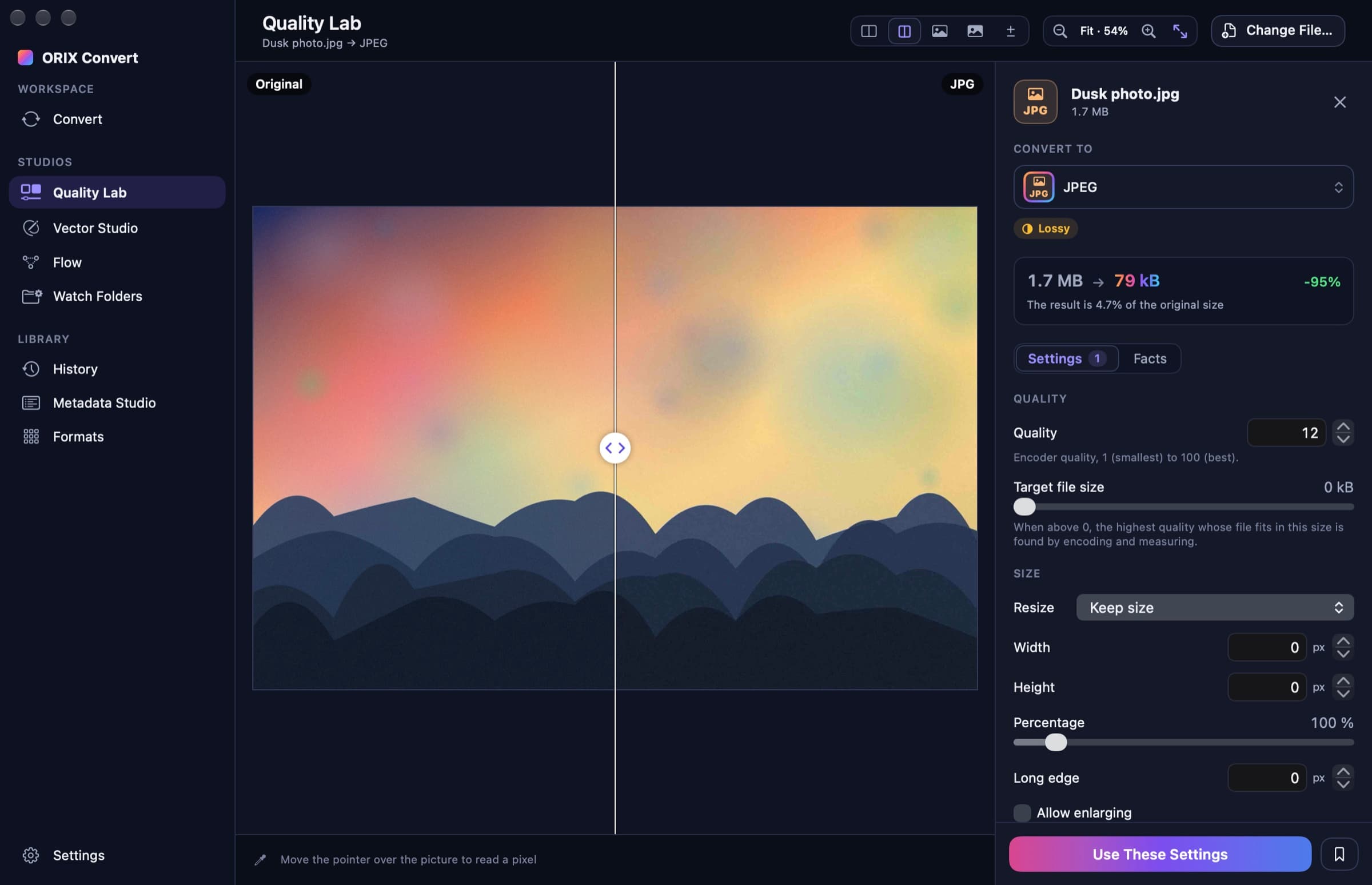
Drop a mixed batch: each file is identified from its content, not its extension, grouped by format, and offered only the destinations that really exist for it. A wrongly named file is flagged.
- 02
Fidelity and limits, before converting
Every conversion path is labelled lossless, structural, partial or lossy, with what it preserves and what it cannot do. Each file gets its own warnings: transparency that will be flattened, an animation reduced to one frame, formulas that become values.
- 03
Verified output, originals protected
Each result is reopened and checked against concrete facts (dimensions, duration, page, row or triangle counts), then moved into place with one atomic rename. A source file is never overwritten unless you ask for exactly that.
- 04
Quality Lab
Try a conversion and compare original and result side by side, with a split slider, an amplified difference view and a measured PSNR; waveforms for audio, frames for video.
- 05
Vector Studio
A tracer written for this app turns logos, icons and line art into SVG or vector PDF: seven modes, live preview, outline and node views, and a measured similarity. No gradients, strokes or centerline tracing.
- 06
PDF tools
Merge, split, extract, reorder, rotate and compress; make a scan searchable with on-device OCR; export pages as images or text.
- 07
Video and audio
A bundled FFmpeg with the Mac's hardware encoders: re-encode, change container without re-encoding, extract audio or subtitles, normalise loudness. No subtitle burn-in and no hardware decoding.
- 08
Documents, spreadsheets and data
Pandoc for structure, LibreOffice for layout, WebKit for print. CSV, Excel, Parquet, SQLite, JSON and more go through an embedded, locked-down DuckDB that handles tables larger than memory. Office layout is not guaranteed to come out identical, and formulas are converted as values.
- 09
Conversion Flow and Watch Folders
Build a workflow of filter, branch, convert, rename and export steps, run it on files or attach it to a folder. Five built-in examples. Folders are watched only while the app is open.
- 10
Presets, Shortcuts, Services and a command-line tool
Twenty-seven built-in presets, three Shortcuts actions, a Services menu entry, drop on the Dock icon, and orix-convert, the same engines on the command line.
- 11
Everything runs on your Mac
The engines ship inside the app: no account, no upload, no telemetry, no update check. The app itself makes no network connection; the networking code that bundled Pandoc, DuckDB and LibreOffice contain is blocked.
- 12
English and French (Canada)
The interface is translated in full. About 850 longer engine messages and the command-line tool are still in English.
Screenshots
Smart Drop: a mixed batch grouped by what each file really is, with a wrong-extension warning. Captures are drawn by the app without a key window, which is why window buttons and native switches are grey. Vector Studio: bitmap on the left, traced vector on the right. Quality Lab: original against result, with a split slider. The difference, amplified 16 times, with the measured PSNR. A batch of 200 generated PDF files in progress, with measured progress. Conversion Flow: a built-in workflow run over four files. PDF tools: merge. The Formats browser: every format and engine of this build, counted from the registry. Smart Drop in the light appearance. The French interface.
A closer look
An app that only offers what it can do
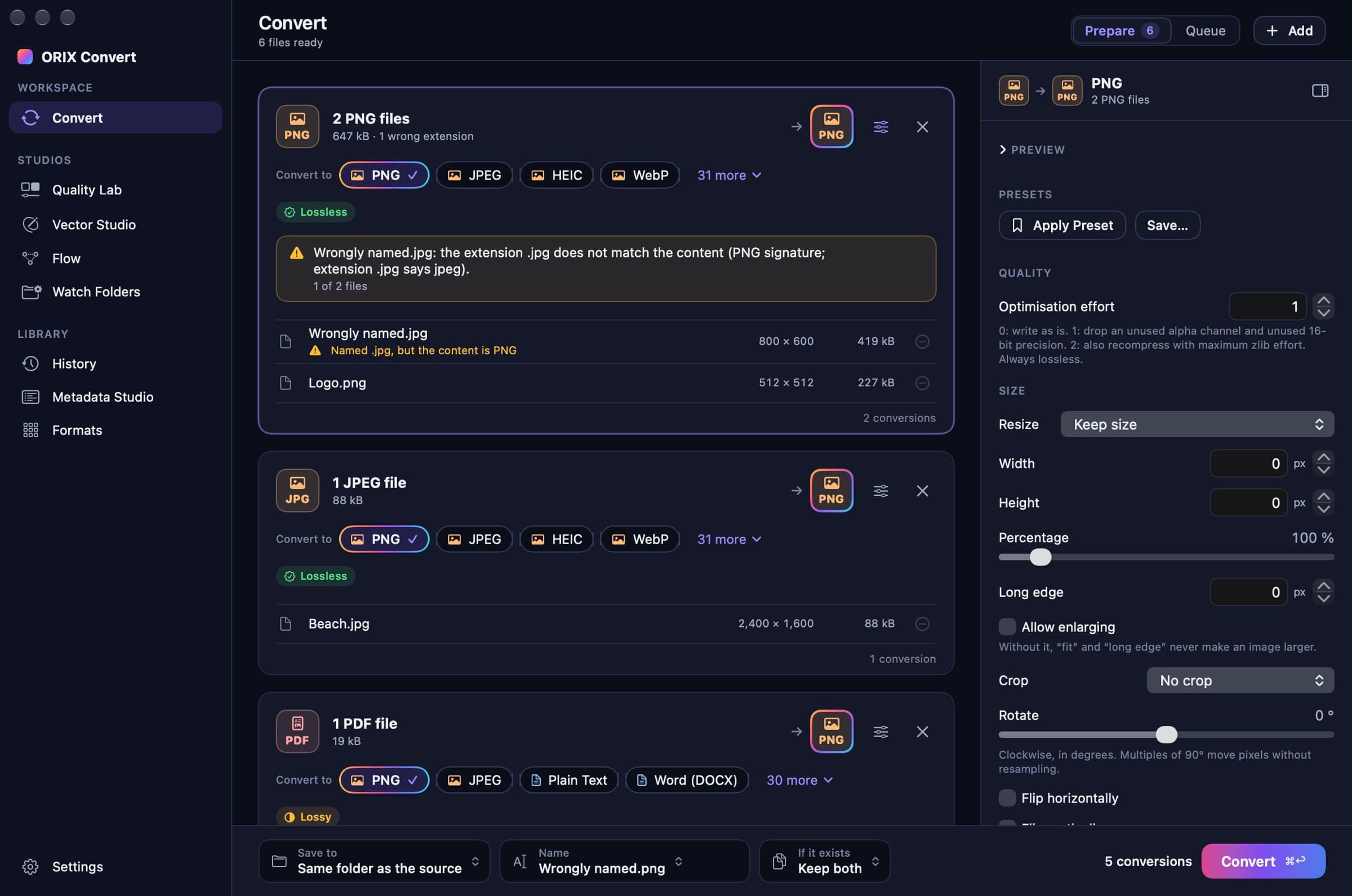
Every destination in the interface comes from a registry of declared conversion paths. A path may be declared only when an engine implements it and a test converts a real fixture through it and validates the output. That registry is the single source for the interface, the command-line tool and every count on this page: 117 formats with a real path, 1,533 distinct source-to-destination pairs, 1,613 paths and 15 engines.
117 formats in sixteen families
Images (22 formats), video (11), audio (12), documents (9), PDF, spreadsheets (3), data (12), presentations (3), archives (12), 3D models (12), fonts (4), subtitles (5), EPUB, geospatial (6), scientific data (HDF5, NetCDF) and SVG. All 117 are read and 111 are written: Camera RAW, DNG, FBX, RAR, KMZ and MIDI are read only, and RAW, DNG, FBX and RAR are experimental, tested on a narrow set of generated files. JPEG XL, Pages and Keynote files are recognised but not converted.
See what a conversion costs before the batch
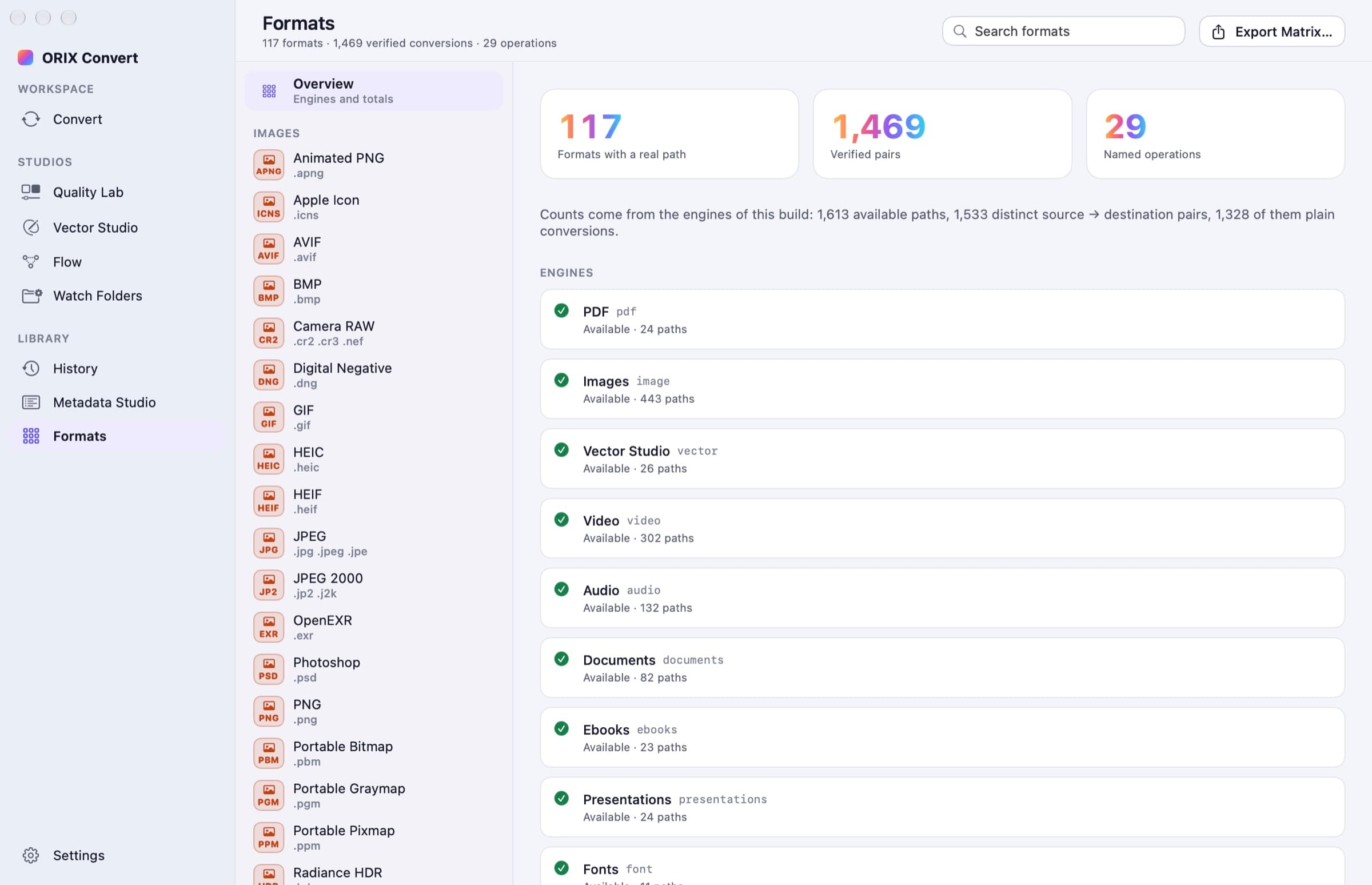
Quality Lab runs a trial conversion and puts original and result on the same canvas: a split slider, a difference view that can be amplified, and figures computed on the files themselves (PSNR, largest sample difference, size). When the settings suit you, one button carries them back to the batch.
Measured, and said so
958 automated tests pass in 14 packages. An end-to-end sweep ran every declared path the way a user would: 1,518 passed, none failed, and 95 were skipped because their source format has no fixture (RAW, DNG, FBX, RAR, KMZ and single-stream compression); 1,438 of the 1,533 pairs are verified end to end. All fixtures are generated: no file from a camera or from another vendor's software is in the corpus. The app has been run on one Mac with macOS 27 only, and nobody has hand-tested drag and drop, menus or VoiceOver.
Technical specifications
- Platform
- Mac (macOS)
- Minimum OS
- macOS 15.0
- Architectures
- arm64
- Current version
- 1.0.0
- Release date
- November 21, 2026
- Download size
- 271 MB
- Permissions
- No permission is requested at launch; macOS asks for access to a folder (Desktop, Documents, Downloads, removable volumes) the first time you convert files stored there
- No entitlements — the app uses the Hardened Runtime and is not sandboxed, because it starts helper programs on the files you choose; the nested LibreOffice carries a single entitlement (allow-jit)
- No login item, launch agent or system extension; the command-line tool is installed only if you run the command shown in Settings
- Apple Silicon only, about 849 MB on disk once installed (271 MB to download)
- Offline
- Everything runs on the Mac, offline. The app itself makes no network connection; bundled Pandoc, DuckDB and LibreOffice contain networking code, which is blocked (see the offline report in the repository).
- Languages
- English · French (Canada)
- Dependencies
- Swift 6 on Apple frameworks first (ImageIO, PDFKit, Vision, VideoToolbox, AudioToolbox, WebKit, Model I/O), then bundled engines where the frameworks stop: FFmpeg 9.1, Pandoc 3.14, LibreOffice 26.8.3 (slimmed), DuckDB 2.0.1, libarchive, libwebp, Assimp, HDF5, woff2 and Yams. Each keeps its own licence.
- Bundle identifier
- ai.spboucher.orix.convert
Downloads
macOS disk image
- Version
- 1.0.0
- Size
- 271 MB
- Requires
- macOS 15.0+
- Architecture
- arm64
- Released
- November 21, 2026
- Checksum verified against the SPB Git release
- Notarized by Apple — verified on this server
SHA-256
60258e0318f7dfd3a9ea52810a4d40d085f964d30eab69f7a70048c9b73311f0
Not on the App Store yet.
Release data synchronized with SPB Git on November 21, 2026.
Release history
1.0.0 (1)
macOS downloadTag v1.0.0- First version: fifteen conversion engines behind one window, for 117 formats.
- Smart Drop, Quality Lab, Vector Studio, Conversion Flow, Watch Folders and Metadata Studio; verified output and atomic writing.
- Presets, Services menu entry, three Shortcuts actions and the orix-convert command-line tool; English and French (Canada).
- Apple Silicon build signed with a Developer ID, notarized by Apple and stapled; DMG, ZIP and SHA-256 checksums published on git.spboucher.ai.
- Known limits: tested on macOS 27 only; RAW, DNG, FBX and RAR are experimental; no JPEG XL, no Pages, Keynote or Numbers, no LaTeX to PDF, no TrueType to OpenType outline conversion, no subtitle burn-in, no animated WebP export.
Privacy
ORIX Convert works on your files, on your Mac. It has no account, no telemetry, no analytics, no crash reporter and no update check, and the app itself makes no network connection. Bundled Pandoc, DuckDB and LibreOffice contain networking code; it is blocked, not absent.
- Files are never uploaded: every conversion runs on the Mac, in the app or in a helper process it starts.
- No first-party source file calls a networking API.
- Pandoc and LibreOffice run with a proxy pointing at a closed local port, with remote content neutralised and link updates disabled; DuckDB runs with external access and extensions disabled. The network protocols of the bundled FFmpeg are compiled out.
- WebKit, a system framework with its own networking process, renders HTML and SVG with JavaScript disabled and navigation to anything but the document itself cancelled.
- Checked on 2026-11-21: 19 of 19 representative conversions succeeded under a sandbox that denies IP networking, and a local canary server received no request from any conversion.
- Stored on your Mac only: history (file paths, formats, options with secrets removed, results), presets, workflows and watch rules. Passwords are never stored.
- Nothing in a document is executed: macros, JavaScript in PDFs and scripts in SVG or HTML are never run.
Verification status
Tested on physical devices
Per the release report of 2026-11-21: 958 automated tests passing in 14 packages; an end-to-end sweep of the 1,613 declared paths with 1,518 passed, 0 failed and 95 skipped for lack of a fixture; the self-test of the signed app passed (144 checks, 0 failed). One data-engine suite failed in an earlier run the same day on a timing-sensitive cancellation test and passed when run again alone. Line coverage was measured for six of the fourteen packages (93.0 % to 96.6 %); the app target is not measured.
Built, tested and run on one Mac only (Apple M5 Max, macOS 27.0). Never run: macOS 15, macOS 26, a second Mac; Gatekeeper was assessed on the build Mac only. Not verified by a person: drag and drop, panels, menus, the Services menu, Shortcuts, keyboard navigation and VoiceOver; there is no automated interface test. All test files are generated: no file from a camera, an authoring tool or another vendor's software is in the corpus, and Camera RAW, DNG, FBX, RAR, PDF to Word or RTF, and PPT media extraction are experimental. The benchmark table was not re-run after the last fixes. The French interface has not been proofread by the owner. Screenshots are drawn by the app itself on generated sample files, without a key window, so window buttons and native switches appear grey.
Questions
Can I download ORIX Convert today?
Yes. Version 1.0.0 (1) is a disk image signed with a Developer ID and notarized by Apple, for Apple Silicon Macs with macOS 15 or later. It is a first release, tested on macOS 27 only: read what has not been verified yet below.
Which formats does it handle?
117 formats with at least one tested conversion path. Images: PNG, JPEG, HEIC, HEIF, WebP, AVIF, TIFF, BMP, GIF, animated PNG, ICO, ICNS, PSD, OpenEXR, Radiance HDR, Targa, PPM, PGM, PBM and JPEG 2000, plus Camera RAW and DNG (read only, experimental). Vector: SVG. Video: MP4, MOV, MKV, AVI, WebM, M4V, MPEG, MPEG-TS, AVCHD, FLV and WMV. Audio: MP3, WAV, FLAC, AAC, M4A, Apple Lossless, AIFF, Ogg Vorbis, Opus, WMA and CAF, plus MIDI (read only). Documents: DOCX, DOC, RTF, plain text, Markdown, HTML, ODT, LaTeX and reStructuredText, plus PDF and EPUB. Spreadsheets and presentations: XLSX, XLS, ODS, PPTX, PPT and ODP. Data: CSV, TSV, JSON, JSON Lines, Parquet, Arrow IPC, SQLite, DuckDB, XML, YAML, TOML and property lists. Archives: ZIP, 7-Zip, TAR, Gzip, Bzip2, XZ, Zstandard and their TAR combinations, plus RAR (read only, experimental). 3D: OBJ, STL, PLY, glTF, GLB, USD, USDA, USDC, USDZ, COLLADA and 3MF, plus FBX (read only, experimental). Fonts: TTF, OTF, WOFF and WOFF2. Subtitles: SRT, WebVTT, ASS, SSA and MicroDVD. Geospatial: GeoJSON, KML, GPX, Shapefile and GeoPackage, plus KMZ (read only). Scientific: HDF5 and NetCDF. Not every pair exists: the app lists the real destinations for each file.
Why is the download so large?
The disk image is 271 MB and the app takes about 849 MB once installed, because LibreOffice, Pandoc, FFmpeg and DuckDB are bundled. That is the cost of converting office formats with real layout without depending on software installed on your Mac. Nothing else is installed: no login item, no launch agent, no system extension.
Does it connect to the Internet?
The app itself makes no network connection: none of its own code calls a networking API, and there is no account, telemetry or update check. Three bundled components do contain networking code (Pandoc, DuckDB and LibreOffice); it is blocked, not absent. In the offline check, 19 of 19 representative conversions succeeded with IP networking denied, and documents pointing at a local canary server were converted without the server receiving a request. The method and its limits are in the offline report of the repository.
Will my Word, Excel and PowerPoint files come out identical?
No such promise is made. Office formats are converted by Pandoc and a bundled LibreOffice: structure and content are carried over, layout can differ, formulas are written as values, and styles, charts and comments in spreadsheets are not kept. The figures behind the office paths come from one synthetic reference document. Each path states its fidelity and limitations before you convert.
What is not supported?
Among other things: Pages, Keynote and Numbers documents; JPEG XL; LaTeX to PDF; outline conversion between TrueType and OpenType fonts; subtitle burn-in; animated WebP export; books with DRM; encrypted 7z or RAR archives; password-protected workbooks. There is no Finder extension (the Services menu covers the same gesture) and a running job can be cancelled but not paused. The complete list is in the Known Limitations section of the README.
Which Macs does it run on?
Apple Silicon Macs with macOS 15 or later; there is no Intel build. It was built and tested on one machine, a Mac with an Apple M5 Max chip and macOS 27.0. It has never been run on macOS 15 or macOS 26, nor on a second Mac.
More from ORIX
See the full catalog Available
ORIX Clean
A native macOS storage analyser and cleaner built around a mandatory preview; removed items go to the Trash.
MacUtilitiesv1.0.0 Beta
ORIX Calc
Standard, scientific, financial, graphing, math, statistics, units and a reactive notebook on one exact engine, fully on device.
iPhoneiPadUtilitiesv1.0.0 Available
ORIX Monitor
A native macOS system monitor with local history, alerts and reports, where every value states its source.
MacSystemv1.0.0